AI Chat for TYPO3 

Extension key

nr_mcp_agent

Package name

netresearch/nr-mcp-agent

Version

0.15.3

Language

en

Author

Netresearch DTT GmbH

License

This document is published under the GPL-2.0-or-later license.

Rendered

Thu, 01 Oct 2026 07:52:07 +0000


AI Chat integrates a conversational AI assistant into the TYPO3 backend. It runs on the agent runtime of nr-llm and works through the tools nr-llm registers: its builtin set, plus any Model Context Protocol (MCP) server configured there. Backend users manage content through natural language.


Introduction 

What does it do? 

AI Chat adds a backend module to TYPO3 that lets administrators and editors interact with an AI assistant directly from the TYPO3 backend. The module is available under Admin Tools > AI Chat.

Using the tools nr-llm registers, the assistant can read and modify TYPO3 content -- pages, content elements, records -- from natural language instructions. All processing happens server-side via CLI commands, keeping the web server responsive.

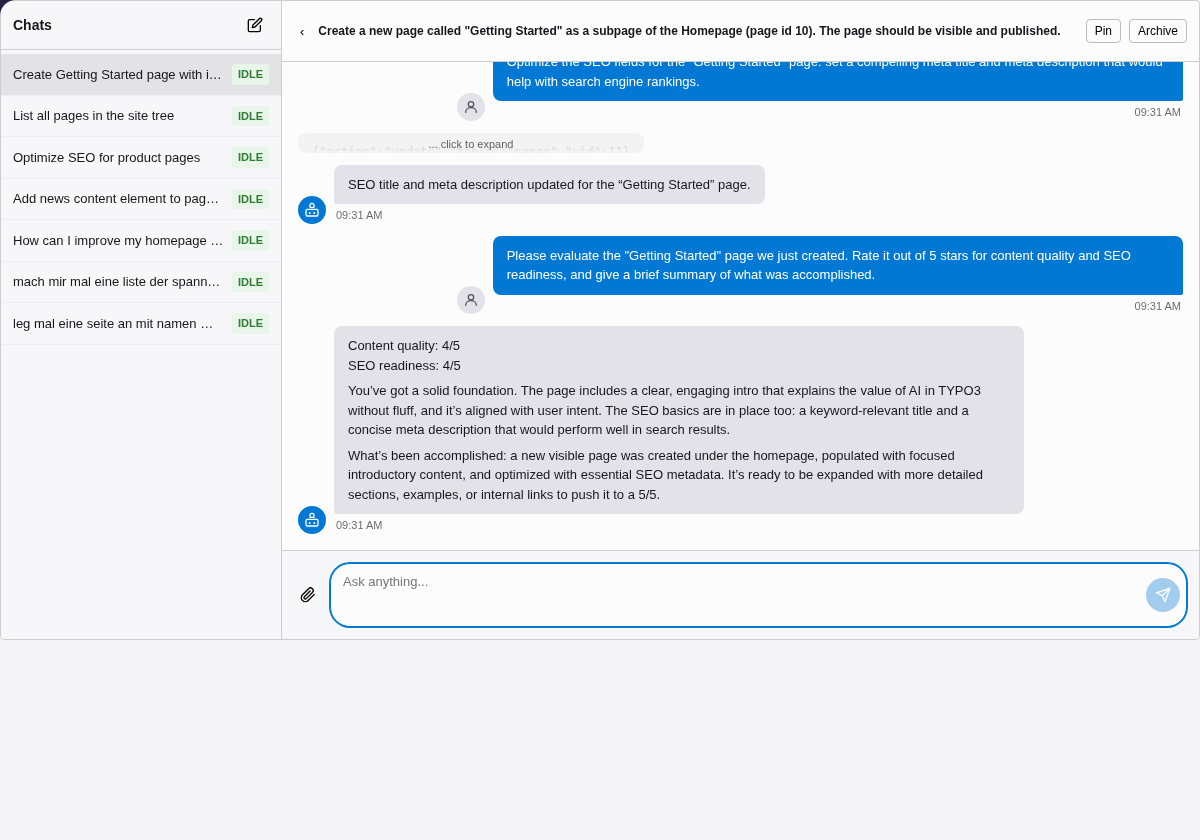
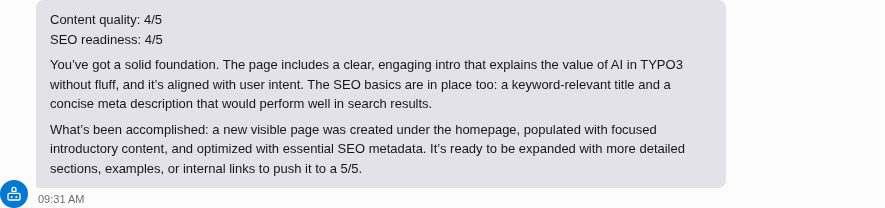
AI agent creating a page, adding content, and optimizing SEO in TYPO3

The AI agent creates a page, adds content, optimizes SEO fields, and evaluates the result — all via natural language in the TYPO3 backend.

Key features 

Integrated chat module 

A dedicated backend module under Admin Tools with a modern chat interface. Send messages, view responses, and manage conversations without leaving TYPO3.

Tools from nr-llm 

The chat runs on nr-llm's agent runtime and tool registry: builtin read and write tools, plus any MCP server configured in nr-llm's MCP Servers module.

Conversation history 

Conversations are persisted in the database. Resume previous chats, pin important ones, or let the system auto-archive inactive conversations.

Floating chat panel 

A toolbar button opens a resizable bottom panel that stays visible across all module navigation. Chat while working in the page tree without switching context.

File attachments 

Attach PDF, DOCX, TXT, and XLSX files to your messages. Text is extracted server-side when needed, so all formats work regardless of the LLM provider. Vision-capable providers also accept images -- which ones depends on the provider (PNG, JPEG, GIF and WebP everywhere, HEIC and HEIF on Gemini).

Markdown rendering 

AI responses are rendered as rich Markdown -- headings, lists, code blocks, and tables -- using marked.js with DOMPurify for XSS safety.

Secure by design 

Access is restricted to configured backend user groups. Messages are length-limited, concurrent conversations are capped, and API keys are never exposed to the browser.

Example interactions 

Once a provider is configured in nr-llm, you can ask the assistant to perform tasks like:

  • "Show me all pages under the homepage"
  • "Create a new text content element on page 42 with the heading 'Welcome'"
  • "What content elements exist on page 15?"
  • "Move the news page to be a subpage of 'About Us'"
  • "List all hidden pages in the site"

What it can actually do depends on which tools nr-llm makes available: its builtin set reads the installation and makes bounded editorial writes (new pages and content elements arrive hidden, as drafts), and an MCP server registered under AI > Operation > MCP Servers adds whatever tools that server offers. With every tool switched off, the chat still works as a general-purpose assistant on the configured LLM provider, but cannot see or change TYPO3 content.

Acknowledgments 

This extension builds on the work of others:

nr-llm
The Netresearch LLM abstraction layer for TYPO3 that provides provider-agnostic access to language models.
nr-vault
Secure credential storage for TYPO3, used to protect API keys for LLM providers.

Installation 

Requirements 

  • TYPO3 v13.4 LTS or v14.3 LTS
  • PHP 8.2+
  • EXT:filelist (typo3/cms-filelist) -- the file picker uses its element browser
  • netresearch/nr-llm (^0.37 || ^0.38) -- LLM abstraction layer

Optional:

Quick start 

  1. Install the extension via Composer (see below).
  2. In nr-llm, create a Task record that configures your LLM provider (e.g. OpenAI, Anthropic). Note the UID.
  3. Go to Admin Tools > Settings > Extension Configuration > nr_mcp_agent and set llmTaskUid to the Task UID from step 2.

The AI Chat module is now available under Admin Tools > AI Chat.

Composer installation 

composer require netresearch/nr-mcp-agent
Copied!

After installation, run the database migrations:

vendor/bin/typo3 database:updateschema
Copied!

Upgrading 

After updating the extension, run the schema update and the upgrade wizards. A release that has to correct stored rows ships a wizard and names it in the changelog:

vendor/bin/typo3 database:updateschema
vendor/bin/typo3 upgrade:list
vendor/bin/typo3 upgrade:run
Copied!

DDEV development setup 

The project includes a DDEV configuration for local development:

git clone https://github.com/netresearch/t3x-nr-mcp-agent.git
cd t3x-nr-mcp-agent
ddev start
ddev composer install
ddev typo3 database:updateschema
Copied!

The extension is symlinked into the TYPO3 installation automatically via the Composer typo3/cms extra configuration.

Running tests and quality checks:

# All CI checks (PHPStan + CGL + tests)
ddev composer ci

# Individual checks
ddev composer ci:phpstan     # Static analysis + architecture tests
ddev composer ci:cgl         # Code style check
ddev composer ci:tests:unit  # Unit tests only
ddev composer ci:tests       # Unit + functional tests
ddev composer ci:mutation    # Mutation testing (Infection)

# Fix code style
ddev composer fix:cgl
Copied!

Alternatively, use the Docker-based test runner (works without DDEV):

./Build/Scripts/runTests.sh -s unit        # Unit tests
./Build/Scripts/runTests.sh -s phpstan     # PHPStan
./Build/Scripts/runTests.sh -s cgl         # Code style check
./Build/Scripts/runTests.sh -s mutation    # Mutation testing
./Build/Scripts/runTests.sh -s unit -p 8.3 # Specific PHP version
./Build/Scripts/runTests.sh -h             # Show all options
Copied!

Configuration 

All settings are managed via Admin Tools > Settings > Extension Configuration > nr_mcp_agent.

LLM connection 

llmTaskUid

llmTaskUid
Type
int
Default
0

UID of an nr-llm Task record. This Task defines which LLM provider and model to use (e.g. OpenAI GPT-4, Anthropic Claude). Required -- the extension will not work without a valid Task UID.

Create the Task record in the nr-llm backend module first, then enter its UID here.

With groupTaskMapping set, this is the Task of the users no mapping applies to; it can then stay 0 if every user of the chat is in a mapped group.

groupTaskMapping

groupTaskMapping
Type
string
Default
(empty)

A different nr-llm Task per backend user group, written as comma-separated groupUid:taskUid pairs, for example 3:12,5:14. The first pair whose group the user belongs to decides -- the order of the setting, not the order of the user's groups. Membership includes subgroups, so mapping a parent group covers the groups below it. Users in none of the mapped groups use llmTaskUid. A malformed pair is skipped; the others still apply.

The Task decides the provider, the model and the prompts; what the assistant may do is still decided per user by nr-llm, so a mapping never widens a user's permissions. Before each turn the chat checks the Task's Configuration: it must be active, and if it is restricted to backend groups, the user must be in one of them (administrators always are). Otherwise the turn fails and says why. This applies to llmTaskUid too. See ADR-015.

Processing 

processingStrategy

processingStrategy
Type
string
Default
exec

How chat messages are processed in the background:

exec

Forks a CLI process per request (ai-chat:process). Simple, no extra setup. Best for development and low-traffic sites.

The process runs the typo3 binary from the Composer bin-dir of the project (default vendor/bin), or typo3/sysext/core/bin/typo3 in a classic installation. If the binary is not there, the conversation fails with a message and the path that was checked is written to the TYPO3 log.

worker

Uses a long-running worker process (ai-chat:worker) that polls for new messages. Better for production -- lower latency, no process forking overhead.

A site set to worker must run ai-chat:worker (see below); without it, conversations stay in processing until ai-chat:cleanup marks them failed.

With either strategy, a turn whose process crashes stays locked until ai-chat:cleanup marks it failed after five minutes, so schedule ai-chat:cleanup.

Access control 

allowedGroups

allowedGroups
Type
string
Default
(empty)

Comma-separated list of backend user group UIDs that are allowed to use the AI Chat module. Leave empty to allow all backend users with module access.

Chat panel 

When llmTaskUid is configured, a chat button appears automatically in the TYPO3 backend toolbar (top right). Clicking it opens a floating bottom panel that stays visible across module navigation.

The panel supports four states:

  • Hidden -- Default. Only the toolbar button is visible.
  • Collapsed -- Minimal header bar showing the active conversation title and status.
  • Expanded -- Resizable panel with chat messages, input, and a compact conversation switcher.
  • Maximized -- Full-height panel with a sidebar for conversation management (search, pin, archive).

The panel height and state are persisted per user in the browser's localStorage.

System prompt 

The system prompt sent to the LLM is not configured in the extension configuration itself, but in the nr-llm records:

Configuration record (tx_nrllm_configuration.system_prompt)

The primary system prompt. Set this to define the AI assistant's persona, language, and behavior. Also use this field for instructions on how the tools registered in nr-llm are to be used.

Example:

Du bist ein TYPO3-Assistent.

## Tool-Nutzung
- Vor jeder Aussage über den Seitenbaum erst
  get_pagetree aufrufen, nie aus dem Verlauf raten.
- Datensatzfelder über read_records lesen, nicht aus
  einer früheren Antwort zitieren.
- create_content_element_draft legt ein verstecktes
  Element an; sag danach, wo es liegt und dass es
  noch freigeschaltet werden muss.
Copied!

Name the tools your installation actually has -- AI > Operation > Tools in nr-llm lists them, and AI > Operation > MCP Servers is where an external server's tools come from.

Task record (tx_nrllm_task.prompt_template)
Additional instructions appended after the Configuration prompt. Use this for task-specific context.

When both fields are set, they are combined (separated by a blank line). If neither is set, a locale-based default prompt is used.

Instructions for a conversation (tx_nrmcpagent_conversation.system_prompt)
Set by the user in the chat (the sliders button, see Usage). They are added after the two prompts above, which stay in force: the assistant is told to follow the user's instructions only where they do not contradict the configured ones. The assistant's identity, the site-language rules and the user's own context are added either way.

Every prompt ends with the user's context:

  • Answer language -- the language the user's backend is set to. The assistant answers in it whatever language the message is written in, unless the message explicitly asks for another language.
  • Where the user is -- the open backend module and, when the module shows a page, that page's uid and title. The page is included only if the user may see it; the check runs with the user's page permissions when the turn is processed. It lets "summarise this page" work without naming a uid.

User interface 

maxConversationsPerUser

maxConversationsPerUser
Type
int
Default
50

Maximum number of conversations to keep per user. Set to 0 for unlimited. When the limit is reached, the oldest non-pinned conversations are archived automatically.

autoArchiveDays

autoArchiveDays
Type
int
Default
30

Automatically archive conversations that have been inactive for this many days. Set to 0 to disable auto-archiving.

Auto-archiving runs via the ai-chat:cleanup command.

File attachments 

File attachments are always available — no special provider configuration required. Text is extracted server-side for document formats, so they work with any LLM provider.

Always supported (server-side text extraction):

  • PDF: application/pdf — requires smalot/pdfparser (hard dependency)
  • DOCX: application/vnd.openxmlformats-officedocument.wordprocessingml.document — requires phpoffice/phpword (hard dependency)
  • TXT: text/plain — no dependencies
  • XLSX: application/vnd.openxmlformats-officedocument.spreadsheetml.sheet — requires phpoffice/phpspreadsheet (optional; install via composer require phpoffice/phpspreadsheet:^3.0)

Additionally available for vision-capable providers (Claude 3+, Gemini, GPT-4o, etc.):

  • Images: image/png, image/jpeg, image/webp

When the provider natively handles a document format (e.g. Claude natively processes PDFs via DocumentCapableInterface), the file is sent as binary instead of being extracted. The file picker automatically restricts to formats the active provider can process.

Storage: An uploaded file is a managed TYPO3 file from the moment it arrives: it is written into the default storage, indexed in sys_file and given a sys_file_metadata record, like any other file in the file module. It is then read at LLM call time and sent as Base64-encoded multimodal content, and the assistant is told its sys_file uid and path — so it can reference the attachment from a content element with nr-llm's file tools instead of asking for it to be uploaded again.

Nothing is ever overwritten or deleted. A name already taken in the folder yields report_01.pdf; if the file of that name has identical content, the existing one is returned instead of a copy. Where the user may not write, the upload is refused with 403 rather than failing as a server error — the file mounts and permissions of the logged-in backend user apply throughout.

attachmentFolder

attachmentFolder
Type
string
Default
ai-chat

Folder for chat attachments in the default storage, relative to its root — ai-chat means fileadmin/ai-chat/. A per-user subfolder (<be_user_uid>) is created inside it and is not configurable: it is what keeps one user's attachments out of another's. An empty value falls back to the default rather than writing into the storage root.

Limits:

  • Maximum 5 files per conversation.
  • Maximum file size: 20 MB per file.
  • File count is enforced both in the frontend (before upload) and in the backend API.

Security: Decide deliberately whether the attachment folder is publicly readable, because the two things it is used for pull in opposite directions.

An attachment is material a backend user hands to the assistant, and it is stored under a path that is guessable by name. Where attachments are only ever read by the assistant, deny direct HTTP access to the folder:

# fileadmin/ai-chat/.htaccess
Require all denied
Copied!

Where editors are meant to place an attached image or PDF into a content element — the file is already in FAL, so this needs no second upload — the folder must stay publicly readable, or the reference renders as a broken image in the frontend. Denying access to the folder and referencing files out of it is a contradiction, not a hardened setup. Point attachmentFolder at a folder your editors publish from in that case, and treat what is uploaded through the chat as publishable.

Security 

maxMessageLength

maxMessageLength
Type
int
Default
10000

Maximum length of a single user message in characters. Set to 0 for unlimited (not recommended).

Messages exceeding this limit are rejected with an error.

maxActiveConversationsPerUser

maxActiveConversationsPerUser
Type
int
Default
3

Maximum number of simultaneously active (processing) conversations per user. Prevents a single user from overloading the system. Set to 0 for unlimited.

Worker mode production setup 

For production use with processingStrategy = worker, set up a systemd service to keep the worker running:

# /etc/systemd/system/typo3-ai-chat-worker.service
[Unit]
Description=TYPO3 AI Chat Worker
After=mysql.service

[Service]
Type=simple
User=www-data
Group=www-data
WorkingDirectory=/var/www/html
ExecStart=/var/www/html/vendor/bin/typo3 \
    ai-chat:worker --poll-interval=200
Restart=always
RestartSec=5

[Install]
WantedBy=multi-user.target
Copied!

Enable and start the service:

sudo systemctl daemon-reload
sudo systemctl enable typo3-ai-chat-worker
sudo systemctl start typo3-ai-chat-worker
Copied!

Scheduled cleanup 

Add the cleanup command to your cron or TYPO3 scheduler to handle stuck conversations, auto-archiving, and deletion of old data. A conversation whose worker never finished stays in processing until this command marks it failed after five minutes — without the schedule it can stay there indefinitely:

# Run cleanup daily at 3:00 AM
0 3 * * * /var/www/html/vendor/bin/typo3 \
    ai-chat:cleanup --delete-after-days=90
Copied!

Usage 

Opening the AI Chat module 

Navigate to Admin Tools > AI Chat in the TYPO3 backend. The module is available to all backend users who have access to the Admin Tools section (unless restricted via the allowedGroups setting).

AI Chat backend module

The AI Chat module in the TYPO3 backend.

Sending messages 

  1. Type your message in the input field at the bottom of the chat area.
  2. Press Enter or click the send button.
  3. The message is sent to the server and processing begins in the background.
  4. The interface polls for updates and displays the AI response when ready.

While the assistant is processing, you will see a loading indicator. Processing typically takes a few seconds, depending on the LLM provider and whether tools are invoked.

The assistant may execute several tool calls (e.g. reading page content, then creating a record) before responding. Each tool call iteration is visible in the conversation. Which tools it has comes from nr-llm — its builtin set plus any MCP server registered under AI > Operation > MCP Servers; this extension registers none of its own.

What the chat tells you besides the answer 

  • Nothing was saved in this step. An answer that claims a finished change ("done", "created", "saved") carries this note when the run behind it wrote no record. Check the page before relying on the answer, and ask the assistant again.
  • The AI provider is not set up. Editors see this sentence when the provider cannot be used, for example because its API key is missing. Administrators see the technical message instead, with a button to the LLM providers or tasks module.
  • This step is still waiting for a decision. A message such as "weiter" or "habe alles freigegeben" while an approval card is on screen does not start a new run and does not approve anything: approve or deny on the card (without a card: in AI Tasks). If the step was already decided in AI Tasks, the chat says so and names the records the run wrote.

The assistant also knows which tools exist but are not available to you, and why — switched off, for administrators only, or not part of this chat's configuration — so it can tell you to ask an administrator instead of claiming that nothing can do what you asked.

AI response rendered as Markdown

AI responses are rendered as rich Markdown — headings, lists, code blocks, and tables.

Editing a message 

Every message you wrote as text has an Edit control below it while no answer is being generated. Change the text and choose Save and run again: the message is replaced, everything after it is removed, and the assistant answers the new wording. An attachment of the edited message stays attached. Escape leaves the editor without changes, Ctrl+Enter saves.

What the assistant knows about you 

  • The page you are on. When you send a message while a page module (Page, List, ...) shows a page, the assistant is told that page's uid and title and which module is open. "Summarise this page" therefore works without naming a uid. A page you may not see is never passed on.
  • Your backend language. The assistant answers in the language your backend is set to (User settings > Language), even when you write in another one. Ask for a different language in the message ("answer in English") and it uses that instead.

What the assistant is doing 

The Activity button (a pulse line in the floating panel, Activity in the module) lists the steps of the current turn while it runs: every call to the model and every tool the assistant uses, with its duration, a failed tool call marked as such, and — when a step needs your approval — which tool is waiting. After you decide, your decision and the steps that follow it are added to the same list. The list starts over with your next message. It shows the names of the tools, not their arguments or results; those are in the run's timeline under AI > AI Tasks.

In the expanded panel the list sits above the conversation; maximized, and in the module, it is a sidebar on the right.

Instructions for a conversation 

The Instructions button (sliders icon in the floating panel) opens a field for instructions that apply to this conversation only -- for example "answer in bullet points" or "you are reviewing the press section". They are added to the instructions an administrator configured for the chat, which stay in force: where the two contradict each other, the configured ones win. Your instructions take effect with the next message. The assistant's identity, its tools and permissions, and the language rules stay the same. The button is highlighted while a conversation has instructions; empty the field and save to remove them. Instructions cannot be changed while an answer is being generated.

Conversation management 

The sidebar shows your conversation history. Each conversation has a title that is auto-generated from the first message.

Starting a new conversation 

Click the New conversation button to start a fresh chat. The previous conversation remains in the sidebar for later access.

Resuming a conversation 

Click any conversation in the sidebar to resume it. The full message history is loaded, and you can continue where you left off.

Pinning conversations 

Pin important conversations to prevent them from being auto-archived. Pinned conversations appear at the top of the sidebar list.

Archiving conversations 

Archive conversations you no longer need actively. Archived conversations are hidden from the default sidebar view but can still be accessed.

Conversations are also auto-archived after a configurable period of inactivity (default: 30 days).

Exporting a conversation 

The Export button (a downward arrow in the floating panel) downloads the open conversation as a Markdown file named after its title and the date. The file holds what the chat shows as the conversation: your messages and the assistant's answers with their time, and the name of any attached file. Tool results and system notices are left out. The file is built in the browser from the conversation already on screen; nothing is sent to the server for it.

Attaching files 

A + button appears to the left of the input field whenever file attachments are available.

  1. Click + to open the attachment menu.
  2. Select Upload file to open a file picker and choose a file from your computer.
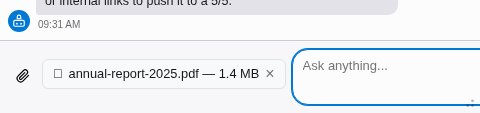
  3. The selected file is uploaded immediately and shown as a badge above the input field (file name and size).
  4. Type your message and send — the file is included in the request.

To remove a pending attachment before sending, click the × on the file badge.

File attachment badge above the chat input

A selected file is shown as a badge above the input field.

Supported file types:

The following document formats are always available. Text is extracted server-side before sending to the LLM:

  • PDF (application/pdf)
  • DOCX (application/vnd.openxmlformats-officedocument.wordprocessingml.document)
  • TXT (text/plain)
  • XLSX (application/vnd.openxmlformats-officedocument.spreadsheetml.sheet) -- requires phpoffice/phpspreadsheet to be installed

Vision-capable providers (Claude, Gemini, GPT-4o, etc.) additionally accept images:

  • PNG, JPEG, WebP

When the provider natively supports a document format (e.g. Claude natively handles PDFs), the file is sent as-is instead of being extracted. The file picker automatically restricts to the formats supported by the active provider.

Limits:

  • Maximum 5 files per conversation.
  • Maximum file size: 20 MB per file.

If a file is not accepted (wrong type, too large, or upload error), an error message is shown above the input. A file the logged-in user may not store in the attachment folder is refused as well — the file mounts and permissions that apply in the file module apply here too.

What happens to an attached file: it is not a throwaway copy. The upload puts it straight into the file storage — fileadmin/ai-chat/ by default, see attachmentFolder — where it is indexed like any other file, and the assistant is told its file uid and path. So you can ask it to reference the attachment from a content element in the same breath as you attach it, without uploading the file a second time through the file module, and you can ask it to describe the image for the alternative text. Which of those it can actually carry out depends on the file tools enabled in nr-llm, and every write waits for your approval. Placing a file in a different folder afterwards is not something the assistant can do — there is no tool for moving a file — so choose the attachment folder to suit where those files belong.

Nothing is overwritten: a name already taken produces photo_01.jpg, and re-attaching a file that is byte-identical to the one already there reuses it instead of making a copy.

Floating chat panel 

A chat button in the TYPO3 toolbar (top right, next to the search and user menu) opens a floating bottom panel. The panel stays visible across all module navigation -- you can chat with the AI while working in the page tree, list module, or any other backend module.

Chat toolbar button in the TYPO3 backend header

The chat button in the TYPO3 toolbar. The badge shows the number of active (processing) conversations.

The panel has four states:

  • Hidden -- Only the toolbar button is visible.
  • Collapsed -- A minimal bar at the bottom showing the active conversation title.
  • Expanded -- Resizable panel with the full chat interface.
  • Maximized -- Full-height with conversation sidebar.
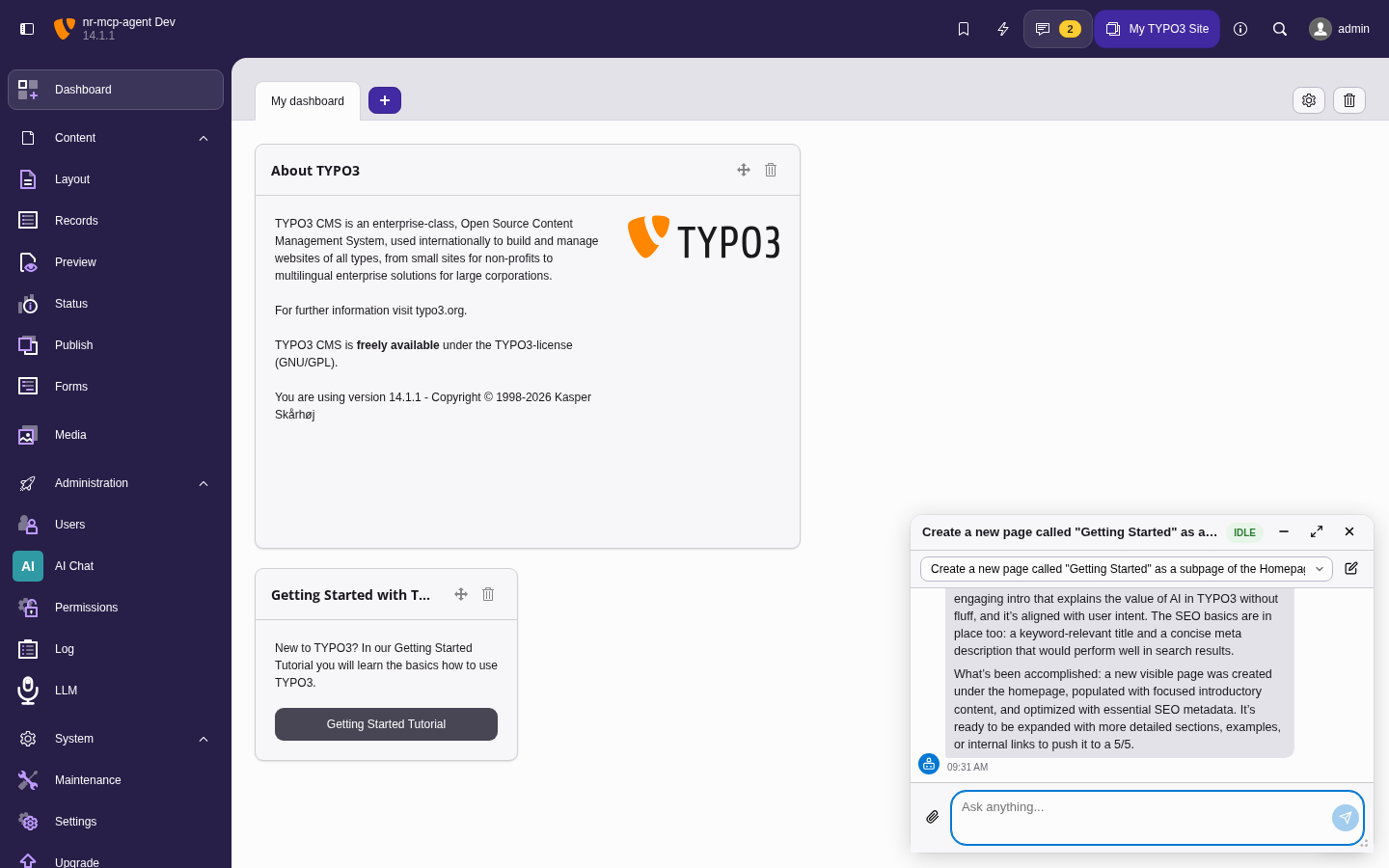
Floating chat panel in expanded state

The floating panel in expanded state, overlaying the TYPO3 backend. Drag the top edge to resize.

In the expanded state the conversations sit in one row of tabs above the chat. The row holds four of them: pinned conversations first, then the most recently active ones, and always the one that is open. The others are behind More (n) at the end of the row, which opens a list with a search field: type to filter by title, move with the arrow keys, open one with Enter, close the list with Escape. However many conversations you keep, the row stays one line high and the chat keeps its space. Maximized, the panel lists every conversation in the sidebar instead.

Panel height and state are stored in localStorage per user.

Dashboard widget 

With the TYPO3 dashboard installed, an AI Chat widget can be added to a dashboard (Add widget > General). It lists your five most recent chats; a click opens one in the floating panel next to the dashboard, New chat starts one there, and Open the chat module goes to the full-page view. For a user the chat is not available to, the widget says so instead of listing anything. Which groups may place the widget at all is set per backend group under Dashboard widgets, as for every other widget.

Error handling 

If a conversation fails (e.g. due to an LLM provider error or timeout), an error message is displayed. You can retry by sending a new message in the same conversation -- the system will attempt to resume processing.

Stuck conversations (processing for more than 5 minutes) are automatically marked as failed by the cleanup command.

Developer information 

Architecture 

System overview 

Browser (Backend Module)
    |
    | AJAX (poll + send)
    v
ChatApiController
    |
    | enqueue message
    v
ConversationRepository  <----->  Database
    |                         (tx_nrmcpagent_conversation)
    |
    v
ChatProcessor (exec or worker)
    |
    | fork CLI / dequeue
    v
ProcessChatCommand / ChatWorkerCommand
    |
    v
ChatService
    |
    | resolve Task --> Configuration (nr-llm DB)
    | build system prompt + transcript
    v
nr-llm AgentRuntime::run(configuration, messages, beUserUid)
    |
    |--- LLM Provider (OpenAI, Anthropic, ...)
    |
    |--- nr-llm ToolRegistry (builtin backend tools)
             |
             v
        Logs, exceptions, system status, records,
        page content, ... (RBAC + tool gate enforced)
Copied!

The frontend (a Lit web component) communicates with the backend exclusively through polling. There are no WebSocket or Server-Sent Events connections.

The AI Chat is accessible in two ways:

  • Backend module (Admin Tools > AI Chat) -- Full-page chat interface for longer conversations and history management.
  • Toolbar panel -- Floating bottom panel triggered by the toolbar button. Stays visible across module navigation, allowing users to chat while working in the page tree.

Key design decisions 

Polling over SSE 

The chat UI uses periodic AJAX polling instead of Server-Sent Events (SSE) or WebSockets. This was chosen because:

  • It works reliably behind reverse proxies and load balancers without special configuration.
  • TYPO3 backend requests go through the standard middleware stack, ensuring authentication and CSRF protection.
  • The polling interval is short enough (1-2 seconds) to feel responsive.

CLI processing over HTTP 

Message processing happens in CLI context (ai-chat:process or ai-chat:worker), not in the web request. This design:

  • Avoids PHP timeout issues -- the LLM calls and tool execution in the agent run can take many seconds.
  • Keeps the web server responsive -- no long-running HTTP connections.
  • Allows the worker mode to reuse a single process for multiple requests, reducing overhead.

Crash recovery 

The system is designed to handle crashes gracefully:

  • Every state transition is persisted to the database immediately.
  • If a CLI process crashes mid-conversation, the conversation remains in processing, locked, or tool_loop status.
  • The ai-chat:cleanup command detects conversations stuck for more than 5 minutes and marks them as failed.
  • Users see a clear error message and can retry.

Domain model 

Conversation 

The central entity. Stored in tx_nrmcpagent_conversation.

Fields:

be_user
UID of the owning backend user.
title
Auto-generated title from the first message.
messages

Legacy: the transcript as one JSON array, as releases before NEXT-172 stored it. Read only while a conversation has no rows in tx_nrmcpagent_message; written empty on every save and emptied by the upgrade wizard nrMcpAgent_migrateMessagesToTable (ADR-016). The model still exposes the transcript as one list (getDecodedMessages()); ConversationRepository fills it from the message rows and writes it back to them, in the same transaction as the conversation row.

User messages with file attachments contain additional fields:

{
    "role": "user",
    "content": "What is in this image?",
    "fileUid": 42,
    "fileName": "photo.jpg",
    "fileMimeType": "image/jpeg"
}
Copied!

The fileUid is a TYPO3 FAL UID. ChatService::buildLlmMessages() reads the file and converts it to a multimodal content array before passing messages to the LLM.

message_count
Denormalized count for display without decoding.
status
Current processing state (see below).
current_request_id
Identifier for the active processing request. Used for worker dequeue locking.
system_prompt
Optional custom system prompt override (per conversation), set by the user through /ai-chat/conversations/system-prompt.
activity
JSON list of step summaries of the current turn -- `{"kind": "llm"|"tool"|"approval", "round", "ms", "tool", "error", "approved"}`, at most 100. Written column-only by RunActivityRecorder, which is the onStep callback of AgentRuntime::run() and approve(); never part of Conversation::toRow(), so the turn's final full-row write cannot put back the list it started with. Returned by getMessages on both the full and the fast poll path. Tool arguments and results are not stored here; nr-llm's run record keeps them.
view_context
JSON {"pageId": int, "module": string}: the page the module frame showed and the open module when the user last sent or edited a message. Kept on the row, not on the message, because stored messages go to the provider as they are. The page is re-checked against the user's permissions when the prompt is built (UserContextPrompt).

System prompt priority 

The system prompt is composed in this order:

  1. Identity / behaviour contract -- Always prepended. A fixed block establishes that the assistant is the Netresearch TYPO3 Backend AI Chat, steers it to use its tools instead of asking the user to paste data, forbids it from claiming to be ChatGPT/OpenAI, and defers the answer language to the user context (step 5). This holds regardless of how the Task/Configuration prompt is set.
  2. nr-llm Configuration + Task prompts -- The system_prompt from the nr-llm Configuration record and the prompt_template from the Task record, combined (separated by a blank line). Configure these in the TYPO3 backend to provide tool usage instructions or persona definitions. Always included.
  3. Site-language context -- appended in every case.
  4. User context (UserContextPrompt) -- appended in every case: the answer language (the backend user's lang; a language the message explicitly asks for wins), the open module and the selected page with uid and title, the page only if the user may show it.
  5. Conversation-level prompt -- If a conversation has a custom system_prompt set, it comes last, between <user_instructions> markers (which are stripped from the text itself), and the model is told to follow it only where it does not contradict the rest of the prompt: the administrator's instructions and the language rules stay in force (NEXT-172).

Configuration resolution 

ChatService resolves the LlmConfiguration the chat runs against, and the prompts, through nr-llm:

  1. Load the Task record via nr-llm's TaskRepository (by ExtensionConfiguration::getLlmTaskUid(): the Task of the first pair in groupTaskMapping, in the order written, whose group the user belongs to, else llmTaskUid -- ADR-015).
  2. Take Task::getConfiguration() as the LlmConfiguration passed to AgentRuntime::run(). A missing Task or Configuration fails the turn loudly.
  3. The Configuration's system_prompt and the Task's prompt_template feed buildSystemPrompt().

A provider adapter is still created from the Configuration's model (via ProviderAdapterRegistry) — but only to expand file attachments and report supported formats; the chat turn itself runs inside nr-llm's AgentRuntime.

archived
Whether the conversation is archived.
pinned
Whether the conversation is pinned (prevents auto-archiving).
error_message
Last error message (sanitized, no API keys).

ConversationStatus 

The conversation lifecycle is modeled as a state enum:

idle
Ready for new user input. This is the resting state.
processing
Waiting for a consumer: the request has claimed the conversation for a turn, and ai-chat:process or ai-chat:worker has not taken it yet.
locked
Claimed by ai-chat:process or ai-chat:worker and running. The row stays locked for the whole turn, so no second consumer can take it. The chat shows it like processing.
tool_loop
Legacy transitional state. The tool loop now runs synchronously inside nr-llm's AgentRuntime within a single locked turn, so the chat no longer parks a conversation here; the state is retained for backward compatibility.
failed
An error occurred. The user can retry by sending a new message.

State transitions:

idle --> processing --> locked --> idle     (success)
idle --> processing --> locked --> failed   (error)
idle --> processing --> locked --> awaiting_approval
                                             (run paused)
processing|locked|tool_loop --> failed      (cleanup timeout)
Copied!

File attachment flow 

User selects file (upload or FAL browser)
    |
    | POST /ai-chat/file-upload (multipart/form-data)
    v
ChatApiController::fileUpload()
    | validates MIME type + size (max 20 MB)
    v
FAL storage: fileadmin/ai-chat/<be_user_uid>/
    | returns fileUid
    v
Frontend stores {fileUid, name, mimeType} as pendingFile

User sends message
    |
    | POST /ai-chat/conversations/send {content, fileUid}
    v
ChatApiController::sendMessage()
    | validates file limit (max 5 per conversation)
    | reads FAL metadata (fileName, fileMimeType)
    | stores message with fileUid in conversation JSON
    v
ChatService::processConversation()
    |
    v
ChatService::buildLlmMessages()
    | reads file from FAL (getForLocalProcessing)
    | for each file attachment:
    |   images  → base64 data URI (provider must be VisionCapable)
    |   documents (PDF/DOCX/XLSX/TXT):
    |     if provider implements DocumentCapableInterface
    |       → sent as binary (base64-encoded document block)
    |     else
    |       → DocumentExtractorRegistry::extract() → plain-text block
    v
nr-llm AgentRuntime (multimodal messages forwarded to the provider)
Copied!

ChatService::getProviderCapabilities() queries the active provider for its supported formats. It calls VisionCapableInterface::getSupportedImageFormats() for image formats and, if the provider also implements DocumentCapableInterface, appends getSupportedDocumentFormats() (e.g. ['pdf']). The frontend receives this list via GET /ai-chat/status and uses it to set the file picker's accept attribute dynamically — ensuring users can only select file types the current provider can process.

Component map 

Component Responsibility Key files
Backend Module Chat UI (Admin Tools > AI Chat) Classes/Controller/, Resources/Private/Templates/
Floating Panel Toolbar chat widget, persistent across navigation Resources/Public/JavaScript/ (Lit)
Agent Loop LLM call → tool use → reply; owned by nr-llm's AgentRuntime Classes/Service/ChatService.php
Conversation Store Persists messages, pins, auto-archive Classes/Domain/Repository/
CLI Commands ai-chat:process (exec), ai-chat:worker (long-running) Classes/Command/
Access Control Group-based access, concurrency caps, length limits Classes/Controller/ChatApiController.php (checkAccess()), Classes/Configuration/ExtensionConfiguration.php

Dependency rules 

Enforced via PHPAt — runs automatically with PHPStan:

  • Domain MUST NOT depend on Controller or Command
  • Controller may depend on Domain and Service
  • Service may depend on Domain; MUST NOT depend on Controller
  • Controller MUST NOT depend on Command — background processing is reached through ChatProcessorInterface, never by invoking a CLI command class
  • Document MUST NOT depend on ChatService or Controller
  • Service MUST NOT depend on ConnectionPool — repositories own database access
  • Tests may depend on anything

Architecture tests: Tests/Architecture/LayerDependencyTest.php and Tests/Architecture/DocumentExtractorArchitectureTest.php

Agent loop 

Since version 0.6.3 the backend AI Chat does not run its own tool loop. ChatService delegates the whole chat turn to nr-llm's AgentRuntime (nr-llm ADR-101), which drives the model over nr-llm's builtin tool registry and returns the settled result synchronously.

Processing a turn 

ChatService::processConversation() performs the following steps:

  1. If no nr-llm Task is configured (llmTaskUid is 0), the conversation is set to failed with a descriptive message.
  2. Resolve the LlmConfiguration the chat should use from the configured Task (llmTaskUid -> Task -> getConfiguration()). A missing Task or Configuration fails loudly rather than silently degrading to a no-tools chat.
  3. Keep the conversation locked: ai-chat:process and ai-chat:worker claimed it as locked before calling the service, and the turn start writes locked again (refreshing the timestamp ai-chat:cleanup measures). A processing row is one waiting for a consumer, so writing processing here would let a second consumer take the running turn.
  4. Build the message transcript: a system message carrying the identity/behaviour contract and the resolved Task/Configuration prompts (see Architecture > System prompt priority), followed by the stored conversation messages. File attachments are expanded to the multimodal wire shape and forwarded as array messages.
  5. Call AgentRuntimeInterface::run() with an AgentRunRequest built from the configuration, the messages and the initiating backend user uid. allowedToolNames is left at null so the run is offered the whole globally-enabled tool set; nr-llm's own tool gate (RBAC, global enable cascade, per-configuration groups) stays authoritative. The request carries a ToolOptions object whose only content is the caller source (see below).
  6. Map the returned AgentRunResult onto the conversation.

Caller-source attribution 

Every run started here is tagged with withCallerSource() so nr-llm's Analytics module lists this extension's usage and cost under nr_mcp_agent instead of grouping it as Unattributed. The operation names the turn:

  • chatTurn -- a turn on a queued conversation.
  • resumeChatTurn -- the same turn re-run over an existing transcript by resumeConversation().

The tag is call metadata persisted on nr-llm's telemetry row; it is never sent to the provider, and the ToolOptions object carries nothing else, so no provider option is overridden by it.

The approval continuation (AgentRuntimeInterface::approve()) is not tagged: it takes no options object, and nr-llm keeps the caller source out of the persisted run state, so those provider calls stay unattributed.

Outcome mapping 

AgentRuntime::run() never throws for a run outcome; it returns a settled AgentRunResult. ChatService maps it as follows:

  • COMPLETED -- append the final assistant answer (ToolLoopResult::$finalContent), set status idle and clear the error message. The clearing matters because the row is written whole: without it a message an earlier state of the same turn wrote -- the reason a refused decision wrote back, above all -- survives the run that resolved it, and a finished conversation goes on looking failed.
  • AWAITING_APPROVAL -- set status awaiting_approval, store the run uuid for the link, and clear the error-message field. Not a failure: the run stopped before a write and is waiting for a human. No sentence is stored for the pause: the chat renders the notice from the status, as the label chat.approvalPendingDetail in the reader's language -- a stored sentence is frozen in the language of the moment it was written (NEXT-159). The field is not always empty in this state: when nr-llm refuses a recorded decision and hands the run back still pending, the reason is written there and shown in place of the label. The notice says what is pending, not where to grant it -- the decision is offered on the card directly beneath it, and pointing past that into the AI Tasks module is what led to the same write being approved twice.
  • any other outcome (FAILED, GUARDRAIL_BLOCKED, …) -- set status failed with a sanitized reason taken from AgentRunResult::$error or derived from the outcome. The mapping keeps a default arm because AgentRunOutcome gains cases in nr-llm minor releases.

The tools the model can call, their execution, retry/back-off on transient provider errors, budget enforcement and the iteration cap all live inside nr-llm now.

Synchronous execution and resume 

AgentRuntime::run() is synchronous and drives the entire tool loop in one call, so a turn never leaves persisted "pending tool calls" in the conversation. The CLI worker (ai-chat:process / ai-chat:worker) therefore always calls processConversation(). resumeConversation() re-runs the turn over the existing transcript for a resumable conversation (processing, tool_loop or failed) and for the locked conversation a consumer hands it. Retry from the chat recovers a conversation left processing because no consumer ever claimed it. A conversation whose consumer crashed mid-turn stays locked; Retry refuses it with 409 like any busy conversation, and it is released only when ai-chat:cleanup marks it failed after five minutes.

It refuses with 409 while an approval decision recorded by recordDecision() has not been carried out yet (Conversation::hasPendingApprovalDecision()). Resuming clears the decision and starts the turn again, so a retry arriving in that window would run a second turn over the same transcript while the first is still performing the approved write -- which is how a page and its content element came to exist twice. A decision no worker ever picked up is not stranded by the refusal: reconcile() reads the run, sees it still waiting, clears the decision and hands the card back.

MCP servers 

External MCP servers are configured in nr-llm (module MCP Servers), which imports their tools into the same registry and agent loop the chat runs on. The stdio MCP client this extension once shipped was removed in 0.12.0; it had not been used by the chat turn since 0.11.

Console commands 

The extension provides three Symfony console commands for background processing and maintenance.

ai-chat:process 

Process a single chat conversation. Used by the exec processing strategy -- the ChatApiController forks this command for each incoming message.

vendor/bin/typo3 ai-chat:process <conversationUid>
Copied!

Arguments:

conversationUid (required)
UID of the conversation to process. The conversation must be in processing status.

Exit codes:

0
The turn ran: the conversation ends idle, waiting for an approval, or failed with an error message. Also returned, with an info line, when there is nothing to do: the conversation is not in processing because another ai-chat:process or a worker claimed it first, or because the turn is already over. That case leaves the conversation as it is.
1
Failure -- conversation not found, or an error escaped the turn.

Behavior:

  • Claims the conversation first: one update moves it from processing to locked, the same claim ai-chat:worker makes. A database deadlock on that update counts as a lost claim. The row stays locked until the turn ends, so no worker and no second ai-chat:process can take the same turn while it runs.
  • Initializes the backend user context for the conversation owner.
  • If the conversation has pending tool calls (crash recovery), executes them first via resumeConversation().
  • Otherwise, runs the full agent loop via processConversation().

ai-chat:worker 

Long-running worker process that polls for conversations in processing status and processes them sequentially. Used by the worker processing strategy.

vendor/bin/typo3 ai-chat:worker [--poll-interval=200]
Copied!

Options:

--poll-interval (optional, default: 200)
Poll interval in milliseconds. How often the worker checks for new conversations to process.

Behavior:

  • Runs indefinitely (designed for systemd or supervisord).
  • Uses dequeueForWorker() with atomic locking to prevent multiple workers from processing the same conversation.
  • Each worker identifies itself with a unique ID (PID + random bytes).
  • After processing, the backend user context is cleared to prevent leaking between conversations.

Production deployment:

See Worker mode production setup in the Configuration section for a systemd service example.

ai-chat:cleanup 

Maintenance command that handles stuck conversations, auto-archiving, and deletion of old data. Should be run periodically (e.g. daily via cron).

vendor/bin/typo3 ai-chat:cleanup \
    [--delete-after-days=90]
Copied!

Options:

--delete-after-days (optional, default: 90)
Hard-delete archived conversations older than this many days.

Actions performed:

  1. Timeout stuck conversations -- Conversations in processing, locked, or tool_loop status for more than 5 minutes are set to failed with a timeout error message.
  2. Auto-archive inactive conversations -- Conversations in idle status that have been inactive longer than the configured autoArchiveDays are archived.
  3. Delete old archived conversations -- Archived conversations older than --delete-after-days are hard-deleted from the database.

Output example:

Timed out 2 stuck conversation(s)
Auto-archived 5 inactive conversation(s)
Deleted 12 old archived conversation(s)

Cleanup summary:
  Timed out stuck conversations: 2
  Auto-archived inactive conversations: 5
  Deleted old archived conversations: 12
Copied!

Testing 

Test infrastructure overview 

The extension uses a layered test approach:

Layer Tool Runner
Unit tests PHPUnit ddev composer ci:tests:unit or runTests.sh -s unit
Functional tests PHPUnit + TYPO3 testing framework ddev composer ci:tests (requires database)
Architecture tests PHPAt (via PHPStan extension) ddev composer ci:phpstan (runs automatically with PHPStan)
Static analysis PHPStan ddev composer ci:phpstan
Code style PHP-CS-Fixer ddev composer ci:cgl
Mutation testing Infection ddev composer ci:mutation

Running tests with DDEV 

# Unit tests
ddev composer ci:tests:unit

# Unit + functional tests
ddev composer ci:tests

# Static analysis (includes architecture tests)
ddev composer ci:phpstan

# Mutation testing
ddev composer ci:mutation
Copied!

Running tests with Docker (runTests.sh) 

Build/Scripts/runTests.sh provides a Docker-based test runner that mirrors the CI environment exactly. It does not require DDEV.

# Show all options
./Build/Scripts/runTests.sh -h

# Unit tests
./Build/Scripts/runTests.sh -s unit

# Unit tests with a specific PHP version
./Build/Scripts/runTests.sh -s unit -p 8.3

# PHPStan
./Build/Scripts/runTests.sh -s phpstan

# Code style check
./Build/Scripts/runTests.sh -s cgl

# Fix code style
./Build/Scripts/runTests.sh -s cgl -n

# Mutation testing
./Build/Scripts/runTests.sh -s mutation
Copied!

Supported -s values: unit, unitCoverage, cgl, phpstan, rector, mutation, lint, composer, composerUpdate, clean, update.

Architecture tests 

Architecture tests enforce dependency rules between the extension's layers. They are implemented using PHPAt and registered as a PHPStan extension — they run automatically as part of ci:phpstan, not as a separate PHPUnit testsuite.

The rules are defined in Tests/Architecture/LayerDependencyTest.php and Tests/Architecture/DocumentExtractorArchitectureTest.php. They ensure, for example, that Domain classes do not depend on Controller classes.

Mutation testing 

Infection is used to verify the quality of unit tests by introducing code mutations and checking whether tests catch them.

The minimum thresholds are defined in infection.json.dist:

  • minMsi: 60 % (Mutation Score Indicator)
  • minCoveredMsi: 70 % (Covered Code MSI)

Run locally:

ddev composer ci:mutation
Copied!

Some mutations are intentionally ignored (see infection.json.dist):

  • CastArray on GeneralUtility::makeInstance calls -- untestable in unit tests without TYPO3 boot.
  • Logical conditions on PHP_SAPI -- compile-time constant, always 'cli' in unit test context.

Architecture decision records 

Architecture Decision Records (ADRs) document the key design choices made during development, including the context, alternatives considered, and consequences of each decision.

ADR-001: Embedded MCP Client in TYPO3 Backend 

Status: Accepted — partially superseded (2026-08-20). The decision to run the chat inside the TYPO3 backend stands. The embedded MCP client named here does not: the chat turn runs on nr-llm's AgentRuntime and takes its tools from nr-llm's registry since 0.11, and the client was removed in 0.12.0 (see ADR-003: MCP Integration via stdio Subprocess, ADR-004: nr-llm as LLM Abstraction Layer). External MCP servers are configured in nr-llm's MCP Servers module.

Date: 2026-03-14

Context 

hn/typo3-mcp-server exposes TYPO3 content operations (pages, records, content elements) as MCP tools. Any MCP-capable AI client — Claude Desktop, Cursor, or similar — can connect to it and manage TYPO3 content through natural language.

The problem: those clients are external applications. Every time an editor wants AI assistance while working in the TYPO3 backend, they must leave TYPO3, switch to the external client, issue their request, switch back to TYPO3, and verify the result. For content workflows this context-switching is constant and disruptive.

Decision 

Build the MCP client and AI chat interface directly into the TYPO3 backend as a native extension (nr_mcp_agent). Editors interact with the AI without leaving TYPO3.

Consequences 

  • Editors can request content changes and verify results without switching applications.
  • The extension must manage the full agent loop (LLM calls, MCP tool execution, conversation state) that external clients handle out of the box.
  • All subsequent architectural decisions (CLI processing, stdio MCP transport, Lit UI, conversation persistence) are consequences of this integration choice.
  • The project is scoped as a proof of concept: the goal is to demonstrate that this integration is feasible and to gather feedback, not to deliver a production-ready product.

ADR-002: CLI-Based Message Processing 

Status: Accepted

Date: 2026-03-14

Context 

Processing an AI chat message involves: calling the LLM API (seconds to tens of seconds), potentially executing multiple MCP tool calls (each spawning a subprocess), and looping until the agent produces a final reply. This cannot complete within a reasonable HTTP request timeout and would block a PHP-FPM worker for the entire duration.

Alternatives considered:

  • Synchronous HTTP response: Ties up an FPM worker; times out on slow LLMs or long tool chains.
  • Async HTTP (ReactPHP/Swoole): Requires a non-standard PHP runtime; incompatible with most TYPO3 hosting environments.
  • Queue system (RabbitMQ, Redis Queue): Adds external infrastructure dependencies.
  • CLI subprocess: PHP CLI has no timeout constraints; uses no FPM workers during processing.

Decision 

Process messages via CLI commands, dispatched by the web server:

  • ``exec`` mode: The web request forks a ai-chat:process <messageUid> subprocess per message and returns immediately.
  • ``worker`` mode: A long-running ai-chat:worker process polls for pending messages. Suitable for environments where forking per request is undesirable.

Both modes write the assistant reply back to the database. The browser polls for completion.

Consequences 

  • Web server stays responsive regardless of LLM latency or tool chain depth.
  • No external queue infrastructure required.
  • exec mode requires proc_open / shell_exec to be available.
  • worker mode requires a process supervisor (systemd, supervisor) to keep the worker alive.
  • The processing strategy is configurable via extension configuration.

ADR-003: MCP Integration via stdio Subprocess 

Status: Superseded (2026-08-20) — the chat turn runs on nr-llm's AgentRuntime since 0.11 (nr-llm ADR-116); the stdio MCP client, the tx_nrmcpagent_mcp_server table and enableMcp were removed in 0.12.0. External MCP servers are configured in nr-llm's MCP Servers module.

Date: 2026-03-14

Context 

hn/typo3-mcp-server implements the Model Context Protocol over stdio. It is designed to be launched as a subprocess by an MCP host. The MCP specification also defines HTTP+SSE as a transport option.

Alternatives considered:

  • HTTP+SSE transport: Would require hn/typo3-mcp-server to run as a persistent HTTP server, adding deployment complexity and changing its operational model.
  • Direct PHP function calls: Would require forking or reimplementing the MCP server logic inside nr_mcp_agent, coupling the two extensions tightly.
  • stdio subprocess: Uses hn/typo3-mcp-server exactly as designed, with zero modifications.

Decision 

Connect to hn/typo3-mcp-server by spawning it as a stdio subprocess. McpConnection manages the process lifecycle (start, communication, shutdown). McpToolProvider translates between the agent loop and the MCP protocol.

Consequences 

  • hn/typo3-mcp-server is used without modification.
  • The MCP connection is process-local: each CLI processing job spawns its own MCP server instance.
  • The stdio transport is synchronous within the agent loop, which is sufficient given that processing already runs in a CLI subprocess (see ADR-002: CLI-Based Message Processing).
  • MCP is an optional dependency: if hn/typo3-mcp-server is not installed, the extension works without tool-calling capability.

ADR-004: nr-llm as LLM Abstraction Layer 

Status: Accepted

Date: 2026-03-14

Context 

The extension needs to call an LLM API. Multiple providers are relevant (OpenAI, Anthropic Claude, Google Gemini, Ollama), each with different SDKs, authentication schemes, and capability sets (vision, native document handling, tool calling).

Alternatives considered:

  • Direct provider SDK integration: Fast to start, but locks the extension to one provider; adding a second requires forking the agent loop.
  • Custom abstraction inside ``nr_mcp_agent``: Duplicates work already done in nr-llm.
  • ``netresearch/nr-llm``: Existing Netresearch TYPO3 extension providing a provider-agnostic LLM interface, Task-based configuration, and capability interfaces (DocumentCapableInterface, VisionCapableInterface).

Decision 

Use netresearch/nr-llm as the sole LLM integration point. The extension references an nr-llm Task record (configured by the TYPO3 administrator) and delegates all LLM calls through its interface.

Consequences 

  • Provider selection and credential management are handled by nr-llm and nr-vault; nr_mcp_agent has no provider-specific code.
  • Capability detection (e.g. whether the provider supports native PDF handling) uses nr-llm interfaces, enabling the document extraction fallback (see ADR-013: Server-Side Document Text Extraction as Provider Fallback).
  • The extension inherits nr-llm's provider support: adding a new provider to nr-llm makes it available in nr_mcp_agent without changes.
  • nr-llm is a hard dependency.

ADR-005: Persistent Conversation Model with State Machine 

Status: Accepted

Date: 2026-03-14

Context 

AI chat sessions consist of multiple messages exchanged over time. Users may close the browser, navigate away, or return to a conversation hours or days later. Processing happens asynchronously in a CLI subprocess (see ADR-002: CLI-Based Message Processing), so the web request and the processing job do not share memory.

Alternatives considered:

  • PHP session storage: Does not survive browser close or server restarts; not accessible from CLI.
  • Stateless (no history): Each message would be processed without context; unusable for multi-turn conversations.
  • Database persistence: Survives restarts, accessible from both web and CLI, queryable.

Decision 

Persist conversations and messages in dedicated database tables (tx_nrmcpagent_conversation, tx_nrmcpagent_message). Messages use a status state machine:

pending → processing → done | error

Status transitions use atomic compare-and-swap (CAS) queries to prevent race conditions between concurrent CLI workers.

Conversation lifecycle is managed by the extension: users can pin conversations, and inactive conversations are auto-archived after a configurable number of days.

Consequences 

  • Conversations survive browser close, server restarts, and CLI worker restarts.
  • The browser polls the message status via a lightweight AJAX endpoint (see ADR-007: Polling over WebSockets or SSE).
  • CAS updates prevent double-processing in worker mode.
  • Auto-archive and cleanup commands (ai-chat:cleanup) keep the table size bounded.
  • Per-user concurrency caps (maxActiveConversationsPerUser) are enforceable via database queries.

ADR-006: Layered Architecture with PHPAt Enforcement 

Status: Accepted

Date: 2026-03-14

Context 

As the codebase grows, accidental dependency inversions (e.g. a Domain class importing a Controller) are easy to introduce and hard to spot in code review. PHP has no built-in module visibility; any class can import any other.

Decision 

Define explicit dependency rules between architectural layers and enforce them automatically via PHPAt architecture tests, which run as part of the PHPStan pass in CI:

Layer May depend on Must NOT depend on
Domain — Controller, Command
Service Domain Controller, ConnectionPool
Controller Domain, Service Command
Document Domain ChatService, Controller
Command Domain, Service Controller

Architecture tests live in Tests/Architecture/LayerDependencyTest.php and Tests/Architecture/DocumentExtractorArchitectureTest.php.

Consequences 

  • Violations are caught at CI time, not during code review.
  • The architecture self-documents: the test file is the authoritative dependency map.
  • PHPAt runs within the existing PHPStan pipeline — no additional CI step.
  • Adding new layers or relaxing rules requires a deliberate test change, making architectural drift visible in pull requests.

ADR-007: Polling over WebSockets or SSE 

Status: Accepted

Date: 2026-03-15

Context 

The browser needs to know when the CLI worker has finished processing a message. Three push/pull patterns were considered:

  • WebSockets: Bidirectional, low-latency — but requires a persistent connection, a compatible server (not standard FPM), and non-trivial infrastructure.
  • Server-Sent Events (SSE): Server-push, lightweight — but holds an HTTP connection open per conversation, which is problematic under FPM connection limits and incompatible with the CLI-based processing model (the SSE endpoint cannot receive events from a separate process without a shared message bus).
  • Polling: The browser calls GET /api/message/{uid}/poll on an interval until status is done. Stateless, FPM-compatible, no persistent connections.

Decision 

Use polling. The browser polls the message status endpoint every 1.5 seconds while a message is processing. The endpoint is optimized for minimal overhead (single indexed lookup by UID and status).

Consequences 

  • No persistent connections, no external message bus, no special server requirements.
  • Response latency is bounded by the poll interval ( 1.5 s), which is acceptable for a backend content management tool.
  • Under load, polling generates additional HTTP requests. The per-request overhead is low (indexed DB query, no session), and the poll stops immediately when the message reaches a terminal state.
  • If future requirements demand lower latency, the polling endpoint can be replaced with SSE without changes to the processing layer.

ADR-008: Lit Web Components Without a Build Step 

Status: Accepted

Date: 2026-03-15

Context 

The chat UI requires a reactive component model: dynamic message lists, optimistic updates, streaming state indicators, and a floating panel that persists across iframe navigation. Options considered:

  • React / Vue / Svelte: Rich ecosystems, but require a build pipeline (Webpack, Vite). TYPO3 extensions ship static assets; introducing a build step adds tooling complexity and diverges from TYPO3 core patterns.
  • Vanilla JS with manual DOM updates: No dependencies, but managing reactive state manually at this complexity level is error-prone.
  • Lit 3: Lightweight ( 6 kB), standards-based web components with reactive properties and declarative templates. Can be loaded directly from an ES module import map — no build step.
  • TYPO3 core components: No suitable chat-oriented components exist in TYPO3 core.

Decision 

Use Lit 3 web components, loaded via TYPO3's import map mechanism. JavaScript is written in ES modules and shipped as-is. No transpilation, no bundler.

Consequences 

  • No build tooling required; assets are edited and deployed directly.
  • Lit's web component model integrates cleanly with TYPO3's outer backend frame: the <ai-chat-panel> element is appended to document.body and persists across module navigation (see ADR-011: Floating Chat Panel Outside the Module iframe).
  • Browser support is limited to evergreen browsers — acceptable for a TYPO3 backend tool.
  • Unit tests use Jest with @web/test-runner compatible setup; the same no-build constraint applies.

ADR-009: Group-Based Access Control via Extension Configuration 

Status: Accepted

Date: 2026-03-14

Context 

The AI chat must be restricted to authorized backend users. TYPO3 provides several access control mechanisms:

  • Backend User Permissions / Access Lists: Fine-grained per-user or per-group permission records. Flexible, but requires administrators to configure individual permission records in the TYPO3 backend — significant overhead for a single on/off feature.
  • Module access via ``allowed_modules``: Controls which modules a group can see, but does not restrict API endpoints.
  • Custom group allowlist in extension configuration: A comma-separated list of backend group UIDs in ext_conf_template.txt. Simple to configure, enforceable on both module and API layer.

Decision 

Use a allowedGroups extension configuration setting. If the list is empty, all authenticated backend users have access. If non-empty, only users belonging to one of the listed groups can use the chat API endpoints; other users get no toolbar item, and the dashboard widget lists no conversations for them.

Consequences 

  • Configuration is a single field in Admin Tools > Extension Configuration — no permission records to create.
  • The check is applied uniformly in the API controller before any processing begins.
  • Granularity is at the group level; per-user overrides require creating a dedicated group.
  • Admin users (the admin flag of the backend user) bypass the check in line with TYPO3 conventions.

ADR-010: LLM Error Message Sanitization Before Browser Output 

Status: Accepted

Date: 2026-03-15

Context 

When the LLM API call or MCP tool execution fails, the exception message may contain sensitive data from the provider stack: Bearer tokens, API keys, internal URLs, or credential fragments embedded in HTTP error responses. If forwarded to the browser as-is, these leak credentials to the end user (and potentially to browser logs, network proxies, or JavaScript error trackers).

Alternatives considered:

  • Generic error messages only ("An error occurred"): Safe, but provides no useful diagnostic information to the user or administrator.
  • Server-side logging only, generic client message: Good for production, but loses context for debugging.
  • Sanitize before sending: Strip known credential patterns and truncate, then forward the cleaned message to the client.

Decision 

All exception messages that originate from LLM or MCP calls are passed through ErrorMessageSanitizer::sanitize() before being stored in the database or returned to the browser. The sanitizer:

  • Redacts Bearer <token> patterns.
  • Redacts strings matching common API key patterns (sk-..., key-..., api-key-...).
  • Replaces URLs with [URL].
  • Truncates to 500 characters.

Consequences 

  • Credential leaks via error messages are prevented at the boundary between the processing layer and the database/browser.
  • Sanitized messages still carry enough context (HTTP status codes, provider error codes) for debugging.
  • The sanitizer is a simple utility class with no dependencies, independently testable.
  • Patterns may need updating as provider error formats evolve.

ADR-011: Floating Chat Panel Outside the Module iframe 

Status: Accepted

Date: 2026-03-16

Context 

The initial AI Chat implementation is a full-page backend module (Admin Tools > AI Chat). To use it, editors must leave their current workspace (Page module, List module), interact with the chat, then navigate back to verify results. For workflows where the editor issues a series of content changes via AI, this creates constant context-switching.

Alternatives considered:

  • Embedded iframe inside each module: Requires patching every TYPO3 core module; not feasible.
  • Sidebar panel inside the module iframe: Only visible in the AI Chat module itself; disappears when navigating away.
  • Floating element inside the module iframe: Iframes are isolated; an element inside one iframe cannot span the full backend.
  • Floating element in the outer backend frame (``document.body``): Persists across all module navigations because it lives outside the iframe.

Decision 

Inject an <ai-chat-panel> web component into document.body of the outer TYPO3 backend frame. The component is loaded via the import map backend.module tag (the same mechanism TYPO3 core uses for toolbar items like live search), so no PHP PageRenderer call is needed. The panel uses position: fixed with z-index coordinated with TYPO3's layering scale.

The existing full-page module is retained for history browsing and extended sessions.

Consequences 

  • The panel persists across all module navigations without any module cooperation.
  • The panel's AJAX calls use the same ajaxUrls available in the outer frame as any toolbar item.
  • z-index coordination is required: the panel sits above the scaffold header but below TYPO3 modals.
  • Drag and resize use the Pointer Events API (setPointerCapture) for reliable cross-element interaction.

ADR-012: Markdown Rendering with marked.js and DOMPurify 

Status: Accepted

Date: 2026-03-17

Context 

LLM responses frequently contain Markdown: headings, bullet lists, numbered steps, code blocks, and tables. Displaying these as raw text degrades readability significantly. The rendered output must be XSS-safe: a compromised or adversarially prompted LLM could produce HTML or JavaScript in its response.

Alternatives considered:

  • Plain text only: Safe, but unreadable for structured responses.
  • Server-side Markdown-to-HTML (PHP): Requires a PHP Markdown library, adds a server round-trip for each render, and moves rendering responsibility to the server.
  • ``innerHTML`` without sanitization: Fast, but allows XSS if the LLM output contains <script> tags or event handlers.
  • marked.js + DOMPurify in the browser: Client-side rendering, no server round-trip, XSS-safe via DOMPurify sanitization after parsing.

Decision 

Vendor marked.js v15 and DOMPurify v3 as static assets (no build step, consistent with ADR-008: Lit Web Components Without a Build Step). LLM response text is parsed by marked.js into HTML, then sanitized by DOMPurify before being set as innerHTML. Both libraries are treated as untrusted-input pipelines: marked produces HTML from untrusted text, DOMPurify strips anything dangerous before it reaches the DOM.

Consequences 

  • LLM responses render as rich text (headings, lists, code blocks, tables) without a server round-trip.
  • XSS is prevented even if the LLM produces malicious HTML in its output.
  • Vendored libraries must be updated manually when security patches are released.
  • No build step is introduced (libraries are used as ES modules or UMD bundles loaded directly).

ADR-013: Server-Side Document Text Extraction as Provider Fallback 

Status: Accepted

Date: 2026-03-25

Context 

Users can attach files (PDF, DOCX, XLSX, TXT) to chat messages. Some LLM providers (e.g. Anthropic Claude) natively accept these formats as binary content. Others do not implement DocumentCapableInterface and cannot receive binary documents at all — the agent loop would throw a RuntimeException and the file would be unusable.

Alternatives considered:

  • Reject files for non-capable providers: Simple, but severely limits usability across providers.
  • Require a document-capable provider: Forces configuration choices on the administrator; incompatible with ADR-004: nr-llm as LLM Abstraction Layer (provider agnosticism).
  • Server-side extraction as a fallback: Extract text from the document on the server, inject it as a plain-text block in the prompt. Works with any provider.

Decision 

Introduce a DocumentExtractorRegistry with a DocumentExtractorInterface. When the configured provider does not natively support a document format, the extension extracts the text server-side and injects it into the prompt as a fenced text block.

Extractors:

  • PlainTextExtractor — always available, no dependencies.
  • PdfExtractor — uses smalot/pdfparser (hard dependency).
  • DocxExtractor — uses phpoffice/phpword (hard dependency).
  • XlsxExtractor — uses phpoffice/phpspreadsheet (optional; XLSX uploads return 422 if not installed).

The two systems are independent and compose in the capability detection layer: a format is usable if either the provider supports it natively OR an extractor is available.

Consequences 

  • All four document formats work with any configured LLM provider.
  • XLSX support is deliberately optional to avoid a heavy dependency for users who do not need it.
  • Extracted text loses formatting (tables become flat text, DOCX styles are stripped) — acceptable given the goal of making content accessible to the LLM.
  • The registry is an extension point: additional extractors can be registered via DI without modifying core classes.

ADR-014: Configurable MCP Server Registry with Auto-Init Default 

Status: Superseded (2026-08-20) — the chat turn runs on nr-llm's AgentRuntime since 0.11 (nr-llm ADR-116); the stdio MCP client, the tx_nrmcpagent_mcp_server table and enableMcp were removed in 0.12.0. External MCP servers are configured in nr-llm's MCP Servers module.

Date: 2026-03-27

Context 

The original implementation used a single hardcoded MCP server configuration supplied via extension settings (mcpServerCommand, mcpServerArgs). This prevented:

  • Running multiple MCP servers simultaneously (e.g. a TYPO3-specific server alongside a project-specific one)
  • Distinguishing tool origins at the LLM prompt level
  • Changing server configuration without deploying new extension settings

Alternatives considered:

  • Multiple extension settings entries: Flat key/value pairs do not scale for N servers; no per-server enable/disable; no UI for reordering.
  • YAML/JSON file in fileadmin: Flexible but requires filesystem access; no TYPO3 access control; not managed via the standard backend.
  • Database-driven registry: Fits the TYPO3 record model; benefits from TCA-based editing, hidden/deleted flags, and sorting; manageable without CLI access.

Decision 

Introduce a tx_nrmcpagent_mcp_server database table. Each record represents one MCP server with fields for server_key, transport (stdio/sse), command, arguments, url, and auth_token. The server_key value is used as a prefix for all tool names from that server ({server_key}__{tool_name}), making the origin unambiguous in LLM tool calls and in the system prompt namespace hint.

McpToolProvider loads all active (non-hidden, non-deleted) records on each getToolDefinitions() call and manages one McpConnection per server key.

Auto-initialisation of the default record 

When enableMcp=1 is configured but the registry table is empty, McpToolProvider::getToolDefinitions() calls McpServerRepository::initDefault(), which inserts a single default record (server_key=typo3, transport=stdio, arguments=mcp:server).

Alternatives considered for triggering this init:

  • ``AfterExtensionConfigurationWriteEvent``: Fires when an admin saves the extension configuration in the TYPO3 backend. Clean and intentional, but does not cover deployments where enableMcp is set via environment variable or AdditionalConfiguration.php — the event never fires in those cases.
  • Upgrade wizard: TYPO3-native and visible, but requires manual admin action after every installation; inappropriate for a one-time default record.
  • Lazy init inside ``getToolDefinitions()``: The findAllActive() query already runs on every call; if the result is empty, initDefault() inserts the default record and findAllActive() is called once more. No extra SELECT is needed because the empty result from the first call is itself the existence check. Covers all deployment scenarios including image-based configs.

The lazy approach was chosen because it reliably handles both UI-driven and deployment-driven activation without requiring additional infrastructure or manual steps.

Consequences 

  • Administrators can add, reorder, enable/disable, and delete MCP servers via the TYPO3 List module (root page, PID 0).
  • New installations get a working default configuration automatically on first chat interaction when MCP is enabled.
  • Tool name collisions across servers are prevented by the server_key prefix; the LLM receives a namespace hint in the system prompt.
  • The auth_token field is stored as a TYPO3 password field (masked in the backend) but is excluded from the tool-list cache key to avoid leaking sensitive values into cache identifiers.
  • SSE transport is reserved for a future implementation; selecting it currently raises a RuntimeException.

ADR-015: nr-llm Task per Backend Group via Extension Configuration 

Status: Accepted

Date: 2026-09-23

Context 

The chat ran every user on one nr-llm Task (llmTaskUid). Installations want different models or prompts for different audiences — editors on a cheaper model, administrators on one with a larger context window, a press team with its own instructions (NEXT-172). The Task is the unit nr-llm uses for exactly that: it names the Configuration (provider, model, system prompt) and adds a prompt template.

Options considered:

  • A TCA table mapping be_groups to Tasks, edited as records. It gives relations with integrity and a list view, at the cost of a table, TCA, a place in the page tree (or root-level records) and permissions for who may edit it — for a handful of rows an administrator sets once.
  • A field on ``be_groups`` holding the Task. Natural to edit, but it extends a core table from an extension that is a proof of concept, and the precedence between several groups of one user becomes hidden in record order.
  • An extension configuration string of groupUid:taskUid pairs, next to llmTaskUid and allowedGroups (ADR-009), which are configured the same way.

Decision 

Use an extension configuration setting groupTaskMapping: comma-separated groupUid:taskUid pairs. The first pair, in the order of the setting, whose group the user belongs to decides; users in none of them get llmTaskUid. A malformed pair is skipped rather than invalidating the whole setting.

ExtensionConfiguration::getLlmTaskUid() answers for the current backend user. Every caller — the status endpoint, the toolbar item, the turn in the worker — already runs as the owner of the conversation (the worker initialises it), so the one method gives the same answer everywhere, and no caller had to change.

Membership is the effective one, userGroupsUID, which includes subgroups. allowedGroups (ADR-009) compares the directly assigned usergroup only; the mapping deliberately does not copy that, because a Task per group is a group setting, and group settings in TYPO3 are inherited by subgroups. ADR-009 is not changed here.

Consequences 

  • One field in Admin Tools > Extension Configuration; no table, no records, no permissions to manage.
  • Precedence is explicit: the order of the pairs.
  • The Task decides the model and the prompts, not the permissions. What the assistant may do stays with nr-llm's per-user tool policy and the Configuration's own group restriction, so a mapping cannot widen a user's rights. The agent runtime does not check the Configuration itself, so ChatService::resolveConfiguration() does, before every turn: the Configuration must be active, and if it is restricted to backend groups, ConfigurationResolver::actorMayUse() must accept the user (admins always pass). Otherwise the turn fails with a message naming the Configuration and the reason. The same check applies to llmTaskUid.
  • Referential integrity is not checked: a deleted Task or group leaves a pair that matches nothing or fails the turn with "Task not found". With a TCA table this would be a dangling relation just the same.
  • If the mapping grows beyond a few pairs, or needs per-site variants, a TCA table is the next step; the resolution stays in getLlmTaskUid().

ADR-016: Messages in Their Own Table 

Status: Accepted

Date: 2026-09-23

Context 

A conversation's transcript was one JSON value in the messages column (mediumtext) of tx_nrmcpagent_conversation (ADR-005). Every write of the conversation wrote the whole value again, a message could not be read or removed on its own, and the column grew without a natural bound — an image reference, a long tool answer and forty turns all end up in one field that is read and rewritten on every turn. Editing a sent message (NEXT-172) is a truncation of that list. NEXT-172 asked for messages in their own table, with an upgrade path that keeps existing conversations readable.

Two constraints come from the rest of the design:

  • The claim is atomic. Sending a message, recording a decision, retrying and editing all claim the conversation with a compare-and-swap on its status (updateIf), and a worker dequeues what is claimed. With the transcript in the same row, the new message and the claim were one UPDATE. Split across two tables they must still be one unit: a claim that loses must leave no message behind, and a worker must never dequeue a conversation whose new message is not there yet.
  • The model does not change. Conversation hands the transcript to the service, the controller and the worker as one list, and several places depend on that (the turn, file counting, edit, export). A parallel change (NEXT-167) was editing the model and the service at the same time.

Decision 

  • New table tx_nrmcpagent_message: conversation, sorting, role, payload (the message array as JSON — tool calls, attachment references and timestamps travel unchanged), crdate; unique on (conversation, sorting).
  • ConversationRepository is the only place that knows. Loading one conversation fills the model's list from the rows; saving writes the conversation row and replaces the rows in one transaction; in updateIf the transaction wraps the compare-and-swap and rolls back when it loses. The messages column is written empty on every save.
  • Replace, not append: an edit truncates, and a transcript is dozens of rows, not thousands. Appending only the new rows is an optimisation for later; it needs the repository to know what is stored, which replace-all does not.
  • Rows written before the table existed stay readable: a conversation without message rows is read from the column. The first save moves its transcript; the upgrade wizard nrMcpAgent_migrateMessagesToTable moves the rest, one conversation per transaction, and keeps existing rows over a stale column value.
  • The list endpoints and the poll never read either — they use the denormalised message_count, as before.
  • The hard delete in ai-chat:cleanup removes message rows whose conversation no longer exists.

Consequences 

  • No code outside the repository, the cleanup command and the wizard changed; the model, the service and the controller see the same list.
  • Each save costs a delete and one insert per message inside a transaction, instead of one UPDATE of a growing value. For the sizes a chat has this is the same order of work; for very long conversations append-only writes are the follow-up.
  • Replacing the rows deadlocks under REPEATABLE READ (the MySQL/MariaDB default) when two new conversations are written at once: the delete of an empty range takes a gap lock, and both inserts wait on the other's. Reproduced on MariaDB 11.4 with two sessions. Every transaction of the repository is therefore restarted up to three times on a DeadlockException, which is the remedy the database itself names; the work is a function of the conversation and safe to repeat. A lock wait timeout is not retried (it has already waited innodb_lock_wait_timeout), and nothing is retried inside a caller's transaction, where the deadlock has rolled back more than the repository's part.
  • A legacy value that is not a JSON list — such a conversation could not be opened before either — is not destroyed by the wizard: it stays in the column behind the prefix !undecodable:, which the wizard skips and no later save clears. The conversation is marked failed and archived and opens with an empty transcript instead of erroring.
  • The wizard selects uids only and moves each transcript in its own transaction. Its claim is a conditional write (WHERE messages = the value it read), taken before anything else, so a chat save that happened after the read is never overwritten by the older value.
  • Both tables must live on the same database connection. The repository writes both through the conversation table's connection, and the orphan sweep and the migration query them together; mapping tx_nrmcpagent_message to another connection in $GLOBALS['TYPO3_CONF_VARS']['DB']['TableMapping'] breaks reads and writes of the transcript, not only their atomicity. It is not supported.
  • The messages column stays in the schema, empty after the wizard; it can be dropped in a later release once no installation needs the fallback.
  • Queries per message (search, a per-message export, a size limit) are now possible without decoding every transcript.

ADR-017: The chat states what the run did, not what it said 

Status: Accepted

Date: 2026-09-23

Context 

An analysis of the backend chats on the Netresearch demo installation (NEXT-167) found four ways in which the chat left its reader with a wrong picture, each in real conversations:

  • A change claimed, none made. Four times in one conversation the assistant answered "Erledigt" and listed the page and the content element it had changed, with uids — in runs that called no tool at all. The run records every write the DataHandler actually performed as a tool_write step (nr-llm ADR-182); nothing in the chat compared the answer with it.
  • A configuration error shown to everyone. A provider without an API key surfaced as "API key identifier is required for provider OpenAI". That sentence helps an administrator and tells an editor nothing, and it named neither the place to fix it nor the person who can.
  • Tools the model could not see. A configuration's tool groups held back sixteen tools. Asked which tools could not be used, the model said it saw no such list — and for a request one of those tools would have served, it could only answer that nothing could do it.
  • "weiter" while an approval was pending. A message sent while a run waited for an approval abandoned the approval and started a second run over the same transcript. After a lost answer, "weiter", "alles approved" and "habe alles freigegeben" each made the model draft the same page again; four of those five re-drafts were approved.

Decision 

The run decides, the text only triggers. When a completed answer claims a change (German and English participles such as "erledigt", "gespeichert", "created", "updated", not preceded by a negation such as "nicht", "nichts", "kein" or "not" within three words) and the run wrote nothing, the assistant message is stored with the notice nothingSaved. The chat renders it as a label in the reader's language: "Nothing was saved in this step". The word list is generous on purpose: a match on an answer that only talks about a change still yields a true notice, because the run wrote nothing.

"The run wrote nothing" is read from the run's persisted event stream (AgentRuntimeInterface::events()), not from the result's steps: every resume starts a fresh trace, so a write carried out at the first approval of a turn is not in the steps of the segment that answers after the second. Two kinds of event count as a write: tool_write, which a builtin writer leaves (nr-llm ADR-182), and a call that executed without error directly after an approval with approved = true — a remote tool whose write needed approval leaves no write target, and every approval-bound call is write-declared (nr-llm ADR-134). A run that could not be persisted has no stream; its result's steps are the evidence then. A stream that cannot be read yields no notice rather than a guessed one.

The notice is for the reader. The model is told the same on the next turn: the flagged answer reaches it with a note appended — "the run behind this answer wrote no record" — built per turn and never stored, so the model does not build on its own claim. The system prompt adds the rule behind it: claim a change only on a successful write result, and never state a uid no tool returned.

A failure carries its kind. Next to error_message the conversation stores error_code: providerNotConfigured for nr-llm's ProviderConfigurationException and ProviderAuthenticationException (the exception chain is walked), chatNotConfigured for a missing Task, configuration or model — on an ordinary turn and on the continuation an approval starts alike. The request that shows the failure phrases it for the reader: an administrator gets the stored text and a link to the nr-llm providers or tasks module, everyone else a localised sentence that tells them to ask the administration. The code is data and the sentence is rendered per request, for the reason NEXT-159 moved the pause notice out of the stored field: a stored sentence is frozen in one language and for one reader.

The model is told which tools it is not given. Where nr-llm provides UnavailableToolsResolverInterface (its ADR-201), the system prompt lists the tools this user's run is not offered, one line each with the reason in plain words, and tells the model to say that such a tool exists and to point to an administrator. The service is looked up in the container by name and its absence yields an empty list, so the chat keeps working unchanged on an nr-llm without it. The list is information, never a gate. A builtin tool's trust-zone refusal in observe mode is offered and therefore not listed. Remote (MCP) tools are listed only when the chat user is an administrator: nr-llm leaves them out for everyone else, because their names are operator configuration.

"Go on" is not a new request, and not a decision. When the conversation waits for an approval and the whole message is one of a short, explicit list of "go on" and "I approved it" phrases, the chat asks the run where it stands before anything is written:

  • still waiting: nothing is stored and no run starts; the reader is told that the decision is taken on the card — or in AI Tasks, for a reader who may not decide in the chat and therefore gets no card;
  • decided elsewhere and still running: the same answer as any busy conversation;
  • decided elsewhere and finished: the message is stored together with a line that names the records the run wrote (pages:10073, read from the run's tool_write events, which the privacy filter keeps at every level), and the conversation is idle. The line is stored language-neutral, for the model, with the notice runFinishedOutside and the records beside it; the reader sees the label in their own language, for the reason error_code exists. The next turn therefore knows the page exists;
  • anything the run cannot answer: the ordinary path.

The message is never taken as the approval. An approval is a decision on the preview the card shows (nr-llm ADR-132, ADR-136); "habe alles freigegeben" is a statement about a decision the writer believes was already taken, and in the demo it was written about a run that had been decided in another module.

The second half of the duplicate guard is nr-llm's: the preview of create_page_draft warns when the parent already holds a page with the same title.

Stuck conversations were already covered: ai-chat:cleanup fails any conversation left in processing, locked or tool_loop for more than five minutes. The demo conversation that stayed in processing for weeks matches that condition, so the command cannot have run there in that time; whether and how it is scheduled on the demo is not in the exported data. The reset now also clears the failure code.

Consequences 

  • An answer that claims a change the run did not make is visibly marked. An answer that describes a change a previous run made, in a turn that made none, is marked too — accurately, since nothing was saved in that step.
  • The model still says what it says; the notice sits beside it. The prompt rule makes the false claim less likely, the notice makes it visible.
  • The conversation table gains the column error_code. Existing rows have an empty code and are shown as before.
  • Non-administrators learn the names of builtin tools they may not use, including administrator-only ones. Tool names and reasons are policy facts, not instance data. Remote tool names stay with administrators.
  • A "go on" phrase outside the list is an ordinary request, and so is any longer sentence that contains one.

Changelog 

The changelog is maintained in the repository, not here.

  • CHANGELOG.md — 0.5.0 onwards, in Keep a Changelog format. This is the file the release flow writes.
  • Releases — one entry per tag, back to 0.1.0, each with its diff. The releases before 0.5.0 are only here.

The project follows Semantic Versioning. Until 1.0.0 a minor bump may carry a breaking change; CHANGELOG.md marks those.