AI Chat for TYPO3 

Extension key

nr_mcp_agent

Package name

netresearch/nr-mcp-agent

Version

0.1.0

Language

en

Author

Netresearch DTT GmbH

License

This document is published under the GPL-2.0-or-later license.

Rendered

Sun, 21 Jun 2026 15:43:50 +0000


AI Chat integrates a conversational AI assistant into the TYPO3 backend. Powered by nr-llm and the Model Context Protocol (MCP), it enables backend users to manage content through natural language.

Introduction 

What does it do? 

AI Chat adds a backend module to TYPO3 that lets administrators and editors interact with an AI assistant directly from the TYPO3 backend. The module is available under Admin Tools > AI Chat.

Through the Model Context Protocol (MCP), the assistant can read and modify TYPO3 content -- pages, content elements, records -- using natural language instructions. All processing happens server-side via CLI commands, keeping the web server responsive.

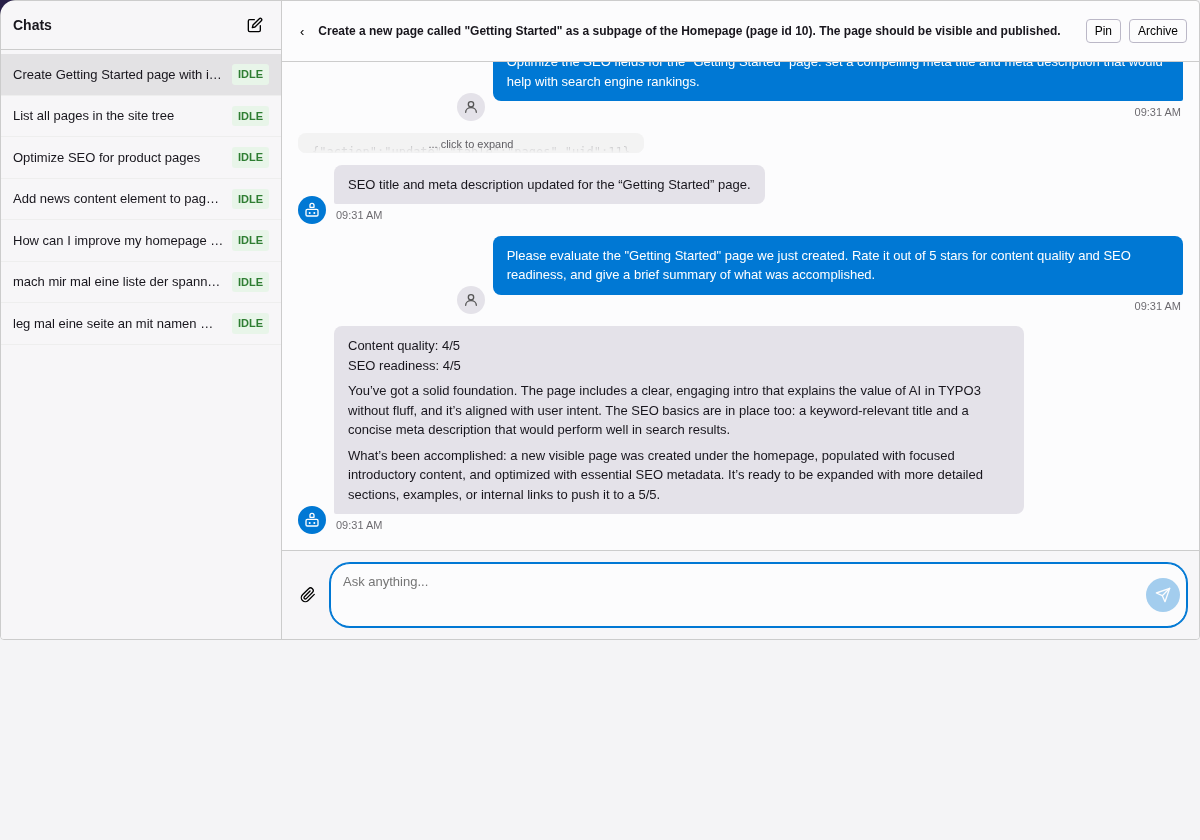
AI agent creating a page, adding content, and optimizing SEO in TYPO3

The AI agent creates a page, adds content, optimizes SEO fields, and evaluates the result — all via natural language in the TYPO3 backend.

Key features 

Integrated chat module 

A dedicated backend module under Admin Tools with a modern chat interface. Send messages, view responses, and manage conversations without leaving TYPO3.

Content management via MCP 

Connect to hn/typo3-mcp-server to give the AI access to TYPO3 content operations -- creating pages, editing records, reading site structure, and more.

Conversation history 

Conversations are persisted in the database. Resume previous chats, pin important ones, or let the system auto-archive inactive conversations.

Floating chat panel 

A toolbar button opens a resizable bottom panel that stays visible across all module navigation. Chat while working in the page tree without switching context.

File attachments 

Attach PDF, DOCX, TXT, and XLSX files to your messages. Text is extracted server-side when needed, so all formats work regardless of the LLM provider. Vision-capable providers also accept images (PNG, JPEG, WebP).

Markdown rendering 

AI responses are rendered as rich Markdown -- headings, lists, code blocks, and tables -- using marked.js with DOMPurify for XSS safety.

Secure by design 

Access is restricted to configured backend user groups. Messages are length-limited, concurrent conversations are capped, and API keys are never exposed to the browser.

Example interactions 

Once configured with MCP enabled, you can ask the assistant to perform tasks like:

  • "Show me all pages under the homepage"
  • "Create a new text content element on page 42 with the heading 'Welcome'"
  • "What content elements exist on page 15?"
  • "Move the news page to be a subpage of 'About Us'"
  • "List all hidden pages in the site"

Without MCP, the assistant works as a general-purpose AI chat (using the configured LLM provider from nr-llm), but cannot interact with TYPO3 content.

Acknowledgments 

This extension builds on the work of others:

hauptsache.net
For creating hn/typo3-mcp-server, the MCP server that exposes TYPO3 content operations as tools.
nr-llm
The Netresearch LLM abstraction layer for TYPO3 that provides provider-agnostic access to language models.
nr-vault
Secure credential storage for TYPO3, used to protect API keys for LLM providers.

Installation 

Requirements 

Optional:

Quick start 

  1. Install the extension via Composer (see below).
  2. In nr-llm, create a Task record that configures your LLM provider (e.g. OpenAI, Anthropic). Note the UID.
  3. Go to Admin Tools > Settings > Extension Configuration > nr_mcp_agent and set llmTaskUid to the Task UID from step 2.

The AI Chat module is now available under Admin Tools > AI Chat.

Composer installation 

composer require netresearch/nr-mcp-agent
Copied!

After installation, run the database migrations:

vendor/bin/typo3 database:updateschema
Copied!

To enable MCP integration (content management tools):

  1. Set enableMcp = 1 in the extension configuration.
  2. Open the List module at pid = 0 and create an MCP Server record. For the built-in TYPO3 MCP server, set Transport to stdio, leave Command empty (defaults to vendor/bin/typo3), and set Arguments to mcp:server (one argument per line).
  3. If you use hn/typo3-mcp-server as the stdio backend, install it first:

    composer require hn/typo3-mcp-server
    
    Copied!

    Then configure the server record as described above.

DDEV development setup 

The project includes a DDEV configuration for local development:

git clone https://github.com/netresearch/t3x-nr-mcp-agent.git
cd t3x-nr-mcp-agent
ddev start
ddev composer install
ddev typo3 database:updateschema
Copied!

The extension is symlinked into the TYPO3 installation automatically via the Composer typo3/cms extra configuration.

Running tests and quality checks:

# All CI checks (PHPStan + CGL + tests)
ddev composer ci

# Individual checks
ddev composer ci:phpstan     # Static analysis + architecture tests
ddev composer ci:cgl         # Code style check
ddev composer ci:tests:unit  # Unit tests only
ddev composer ci:tests       # Unit + functional tests
ddev composer ci:mutation    # Mutation testing (Infection)

# Fix code style
ddev composer fix:cgl
Copied!

Alternatively, use the Docker-based test runner (works without DDEV):

./Build/Scripts/runTests.sh -s unit        # Unit tests
./Build/Scripts/runTests.sh -s phpstan     # PHPStan
./Build/Scripts/runTests.sh -s cgl         # Code style check
./Build/Scripts/runTests.sh -s mutation    # Mutation testing
./Build/Scripts/runTests.sh -s unit -p 8.3 # Specific PHP version
./Build/Scripts/runTests.sh -h             # Show all options
Copied!

Configuration 

All settings are managed via Admin Tools > Settings > Extension Configuration > nr_mcp_agent.

LLM connection 

llmTaskUid

llmTaskUid
Type
int
Default
0

UID of an nr-llm Task record. This Task defines which LLM provider and model to use (e.g. OpenAI GPT-4, Anthropic Claude). Required -- the extension will not work without a valid Task UID.

Create the Task record in the nr-llm backend module first, then enter its UID here.

Processing 

processingStrategy

processingStrategy
Type
string
Default
exec

How chat messages are processed in the background:

exec
Forks a CLI process per request (ai-chat:process). Simple, no extra setup. Best for development and low-traffic sites.
worker
Uses a long-running worker process (ai-chat:worker) that polls for new messages. Better for production -- lower latency, no process forking overhead.

Access control 

allowedGroups

allowedGroups
Type
string
Default
(empty)

Comma-separated list of backend user group UIDs that are allowed to use the AI Chat module. Leave empty to allow all backend users with module access.

MCP integration 

enableMcp

enableMcp
Type
boolean
Default
false

Enable MCP (Model Context Protocol) server integration.

When enabled, the AI assistant can call tools exposed by any configured MCP server. When disabled, it works as a plain chat without tool access.

MCP servers are configured as records in the TYPO3 List module (see MCP server records below).

MCP server records 

MCP servers are configured as database records, not via extension settings. After enabling MCP:

  1. Open the TYPO3 List module and navigate to pid = 0 (the root page).
  2. Create a new record of type MCP Server.
  3. Fill in the fields:

    Name
    Human-readable label (e.g. TYPO3 MCP Server).
    Server key
    Machine identifier used to namespace tools (e.g. typo3). Lowercase letters, digits, and underscores only. Must be unique.
    Transport
    stdio (subprocess via stdin/stdout) or sse (HTTP SSE endpoint — not yet implemented).

    For stdio transport:

    Command
    Path to the MCP server binary. Defaults to vendor/bin/typo3 in the project root.
    Arguments
    One argument per line (e.g. mcp:server).
  4. Save the record. The tool cache is flushed automatically.

Tool names are prefixed with the server key to avoid collisions between servers. For example, a tool named ReadTable on a server with key typo3 becomes typo3__ReadTable in the LLM context.

The connection status fields (read-only) show the last known state of each server connection.

Chat panel 

When llmTaskUid is configured, a chat button appears automatically in the TYPO3 backend toolbar (top right). Clicking it opens a floating bottom panel that stays visible across module navigation.

The panel supports four states:

  • Hidden -- Default. Only the toolbar button is visible.
  • Collapsed -- Minimal header bar showing the active conversation title and status.
  • Expanded -- Resizable panel with chat messages, input, and a compact conversation switcher.
  • Maximized -- Full-height panel with a sidebar for conversation management (search, pin, archive).

The panel height and state are persisted per user in the browser's localStorage.

System prompt 

The system prompt sent to the LLM is not configured in the extension configuration itself, but in the nr-llm records:

Configuration record (tx_nrllm_configuration.system_prompt)

The primary system prompt. Set this to define the AI assistant's persona, language, and behavior. Also use this field for tool usage instructions when MCP is enabled.

Example for MCP usage:

Du bist ein TYPO3-Assistent.

## Tool-Nutzung
- Bei WriteTable gehören Record-Felder IMMER in den
  "data" Parameter als Objekt.
- Beispiel: {"action": "create", "table": "pages",
  "pid": 1, "data": {"title": "Meine Seite"}}
Copied!
Task record (tx_nrllm_task.prompt_template)
Additional instructions appended after the Configuration prompt. Use this for task-specific context.

When both fields are set, they are combined (separated by a blank line). If neither is set, a locale-based default prompt is used. A per-conversation system_prompt field can override everything (set programmatically, not via UI).

User interface 

maxConversationsPerUser

maxConversationsPerUser
Type
int
Default
50

Maximum number of conversations to keep per user. Set to 0 for unlimited. When the limit is reached, the oldest non-pinned conversations are archived automatically.

autoArchiveDays

autoArchiveDays
Type
int
Default
30

Automatically archive conversations that have been inactive for this many days. Set to 0 to disable auto-archiving.

Auto-archiving runs via the ai-chat:cleanup command.

File attachments 

File attachments are always available — no special provider configuration required. Text is extracted server-side for document formats, so they work with any LLM provider.

Always supported (server-side text extraction):

  • PDF: application/pdf — requires smalot/pdfparser (hard dependency)
  • DOCX: application/vnd.openxmlformats-officedocument.wordprocessingml.document — requires phpoffice/phpword (hard dependency)
  • TXT: text/plain — no dependencies
  • XLSX: application/vnd.openxmlformats-officedocument.spreadsheetml.sheet — requires phpoffice/phpspreadsheet (optional; install via composer require phpoffice/phpspreadsheet:^3.0)

Additionally available for vision-capable providers (Claude 3+, Gemini, GPT-4o, etc.):

  • Images: image/png, image/jpeg, image/webp

When the provider natively handles a document format (e.g. Claude natively processes PDFs via DocumentCapableInterface), the file is sent as binary instead of being extracted. The file picker automatically restricts to formats the active provider can process.

Storage: Uploaded files are stored in TYPO3 FAL under fileadmin/ai-chat/<be_user_uid>/. They are read at LLM call time and sent as Base64-encoded multimodal content. Each file is stored in a user-specific subfolder; the API enforces that users can only attach their own files (cross-user access attempts return 404).

Limits:

  • Maximum 5 files per conversation.
  • Maximum file size: 20 MB per file.
  • File count is enforced both in the frontend (before upload) and in the backend API.

Security: The fileadmin/ai-chat/ directory should be protected from direct HTTP access. Add the following to your web server configuration or deploy a .htaccess file to fileadmin/ai-chat/:

# fileadmin/ai-chat/.htaccess
Require all denied
Copied!

Security 

maxMessageLength

maxMessageLength
Type
int
Default
10000

Maximum length of a single user message in characters. Set to 0 for unlimited (not recommended).

Messages exceeding this limit are rejected with an error.

maxActiveConversationsPerUser

maxActiveConversationsPerUser
Type
int
Default
3

Maximum number of simultaneously active (processing) conversations per user. Prevents a single user from overloading the system. Set to 0 for unlimited.

Worker mode production setup 

For production use with processingStrategy = worker, set up a systemd service to keep the worker running:

# /etc/systemd/system/typo3-ai-chat-worker.service
[Unit]
Description=TYPO3 AI Chat Worker
After=mysql.service

[Service]
Type=simple
User=www-data
Group=www-data
WorkingDirectory=/var/www/html
ExecStart=/var/www/html/vendor/bin/typo3 \
    ai-chat:worker --poll-interval=200
Restart=always
RestartSec=5

[Install]
WantedBy=multi-user.target
Copied!

Enable and start the service:

sudo systemctl daemon-reload
sudo systemctl enable typo3-ai-chat-worker
sudo systemctl start typo3-ai-chat-worker
Copied!

Scheduled cleanup 

Add the cleanup command to your cron or TYPO3 scheduler to handle stuck conversations, auto-archiving, and deletion of old data:

# Run cleanup daily at 3:00 AM
0 3 * * * /var/www/html/vendor/bin/typo3 \
    ai-chat:cleanup --delete-after-days=90
Copied!

Usage 

Opening the AI Chat module 

Navigate to Admin Tools > AI Chat in the TYPO3 backend. The module is available to all backend users who have access to the Admin Tools section (unless restricted via the allowedGroups setting).

AI Chat backend module

The AI Chat module in the TYPO3 backend.

Sending messages 

  1. Type your message in the input field at the bottom of the chat area.
  2. Press Enter or click the send button.
  3. The message is sent to the server and processing begins in the background.
  4. The interface polls for updates and displays the AI response when ready.

While the assistant is processing, you will see a loading indicator. Processing typically takes a few seconds, depending on the LLM provider and whether MCP tools are invoked.

If MCP is enabled, the assistant may execute multiple tool calls (e.g. reading page content, then creating a record) before responding. Each tool call iteration is visible in the conversation.

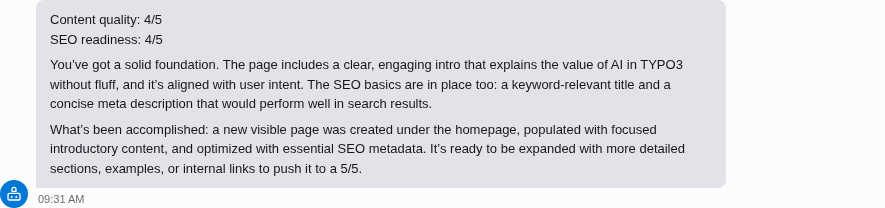
AI response rendered as Markdown

AI responses are rendered as rich Markdown — headings, lists, code blocks, and tables.

Conversation management 

The sidebar shows your conversation history. Each conversation has a title that is auto-generated from the first message.

Starting a new conversation 

Click the New conversation button to start a fresh chat. The previous conversation remains in the sidebar for later access.

Resuming a conversation 

Click any conversation in the sidebar to resume it. The full message history is loaded, and you can continue where you left off.

Pinning conversations 

Pin important conversations to prevent them from being auto-archived. Pinned conversations appear at the top of the sidebar list.

Archiving conversations 

Archive conversations you no longer need actively. Archived conversations are hidden from the default sidebar view but can still be accessed.

Conversations are also auto-archived after a configurable period of inactivity (default: 30 days).

Attaching files 

A + button appears to the left of the input field whenever file attachments are available.

  1. Click + to open the attachment menu.
  2. Select Upload file to open a file picker and choose a file from your computer.
  3. The selected file is uploaded immediately and shown as a badge above the input field (file name and size).
  4. Type your message and send — the file is included in the request.

To remove a pending attachment before sending, click the × on the file badge.

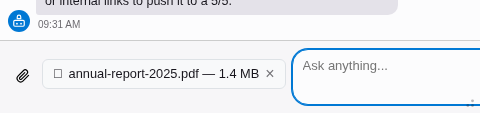
File attachment badge above the chat input

A selected file is shown as a badge above the input field.

Supported file types:

The following document formats are always available. Text is extracted server-side before sending to the LLM:

  • PDF (application/pdf)
  • DOCX (application/vnd.openxmlformats-officedocument.wordprocessingml.document)
  • TXT (text/plain)
  • XLSX (application/vnd.openxmlformats-officedocument.spreadsheetml.sheet) -- requires phpoffice/phpspreadsheet to be installed

Vision-capable providers (Claude, Gemini, GPT-4o, etc.) additionally accept images:

  • PNG, JPEG, WebP

When the provider natively supports a document format (e.g. Claude natively handles PDFs), the file is sent as-is instead of being extracted. The file picker automatically restricts to the formats supported by the active provider.

Limits:

  • Maximum 5 files per conversation.
  • Maximum file size: 20 MB per file.

If a file is not accepted (wrong type, too large, or upload error), an error message is shown above the input.

Floating chat panel 

A chat button in the TYPO3 toolbar (top right, next to the search and user menu) opens a floating bottom panel. The panel stays visible across all module navigation -- you can chat with the AI while working in the page tree, list module, or any other backend module.

Chat toolbar button in the TYPO3 backend header

The chat button in the TYPO3 toolbar. The badge shows the number of active (processing) conversations.

The panel has four states:

  • Hidden -- Only the toolbar button is visible.
  • Collapsed -- A minimal bar at the bottom showing the active conversation title.
  • Expanded -- Resizable panel with the full chat interface.
  • Maximized -- Full-height with conversation sidebar.
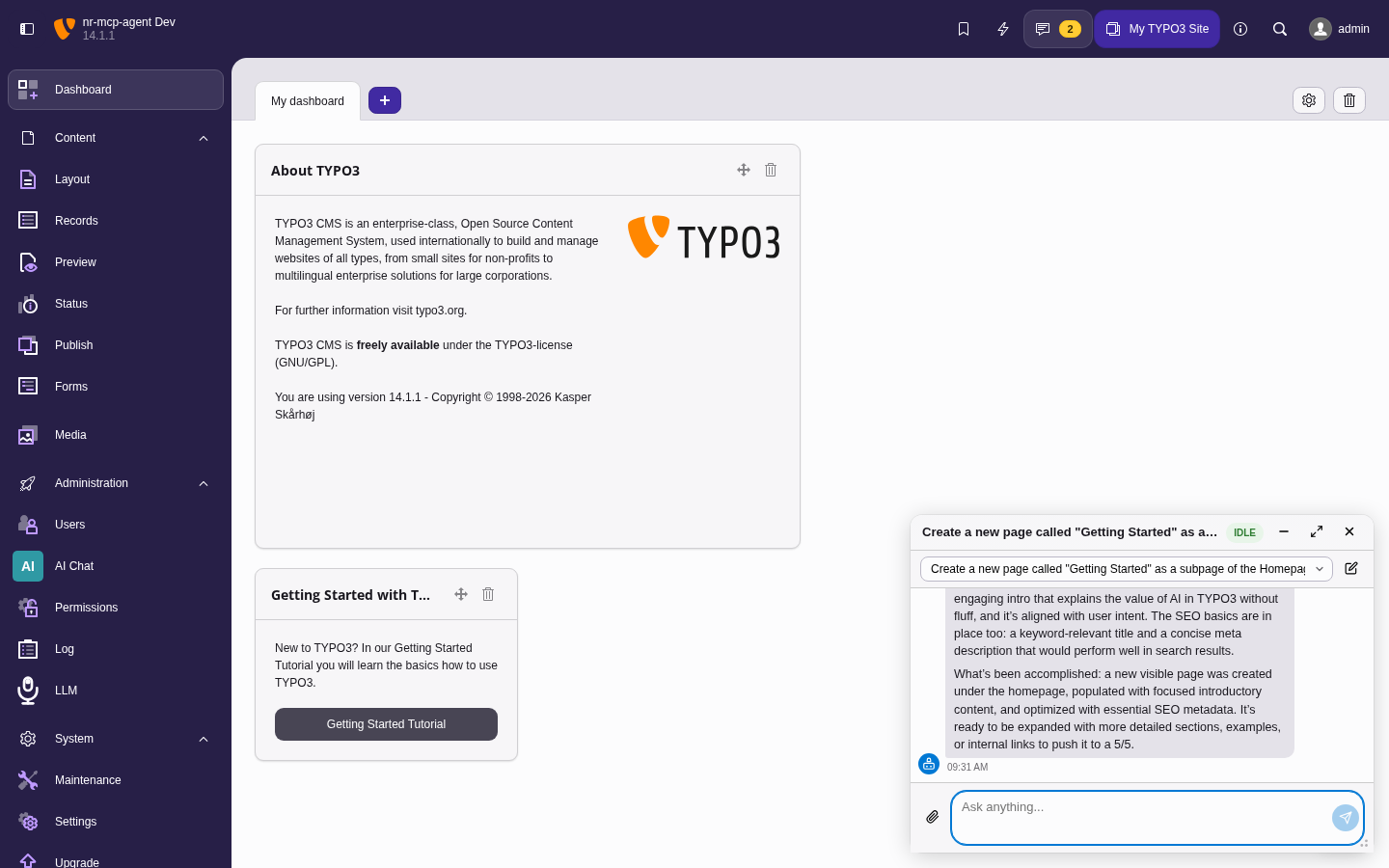
Floating chat panel in expanded state

The floating panel in expanded state, overlaying the TYPO3 backend. Drag the top edge to resize.

Panel height and state are stored in localStorage per user.

Error handling 

If a conversation fails (e.g. due to an LLM provider error or timeout), an error message is displayed. You can retry by sending a new message in the same conversation -- the system will attempt to resume processing.

Stuck conversations (processing for more than 5 minutes) are automatically marked as failed by the cleanup command.

Developer information 

Architecture 

System overview 

Browser (Backend Module)
    |
    | AJAX (poll + send)
    v
ChatApiController
    |
    | enqueue message
    v
ConversationRepository  <----->  Database
    |                         (tx_nrmcpagent_conversation)
    |
    v
ChatProcessor (exec or worker)
    |
    | fork CLI / dequeue
    v
ProcessChatCommand / ChatWorkerCommand
    |
    v
ChatService
    |
    |--- resolveProvider()
    |        |
    |        v
    |    Task --> Configuration --> Model (nr-llm DB)
    |        |
    |        v
    |    ProviderAdapterRegistry (nr-llm)
    |        |
    |        v
    |    LLM Provider (OpenAI, Anthropic, ...)
    |
    |--- McpToolProvider
             |
             v
        MCP Server (hn/typo3-mcp-server)
             |
             v
        TYPO3 Content (pages, tt_content, ...)
Copied!

The frontend (a Lit web component) communicates with the backend exclusively through polling. There are no WebSocket or Server-Sent Events connections.

The AI Chat is accessible in two ways:

  • Backend module (Admin Tools > AI Chat) -- Full-page chat interface for longer conversations and history management.
  • Toolbar panel -- Floating bottom panel triggered by the toolbar button. Stays visible across module navigation, allowing users to chat while working in the page tree.

Key design decisions 

Polling over SSE 

The chat UI uses periodic AJAX polling instead of Server-Sent Events (SSE) or WebSockets. This was chosen because:

  • It works reliably behind reverse proxies and load balancers without special configuration.
  • TYPO3 backend requests go through the standard middleware stack, ensuring authentication and CSRF protection.
  • The polling interval is short enough (1-2 seconds) to feel responsive.

CLI processing over HTTP 

Message processing happens in CLI context (ai-chat:process or ai-chat:worker), not in the web request. This design:

  • Avoids PHP timeout issues -- LLM calls and MCP tool execution can take many seconds.
  • Keeps the web server responsive -- no long-running HTTP connections.
  • Allows the worker mode to reuse a single process for multiple requests, reducing overhead.

Crash recovery 

The system is designed to handle crashes gracefully:

  • Every state transition is persisted to the database immediately.
  • If a CLI process crashes mid-conversation, the conversation remains in processing, locked, or tool_loop status.
  • The ai-chat:cleanup command detects conversations stuck for more than 5 minutes and marks them as failed.
  • Users see a clear error message and can retry.

Domain model 

Conversation 

The central entity. Stored in tx_nrmcpagent_conversation.

Fields:

be_user
UID of the owning backend user.
title
Auto-generated title from the first message.
messages

JSON-encoded array of all messages (user, assistant, tool calls, tool results). Stored as mediumtext.

User messages with file attachments contain additional fields:

{
    "role": "user",
    "content": "What is in this image?",
    "fileUid": 42,
    "fileName": "photo.jpg",
    "fileMimeType": "image/jpeg"
}
Copied!

The fileUid is a TYPO3 FAL UID. ChatService::buildLlmMessages() reads the file and converts it to a multimodal content array before passing messages to the LLM.

message_count
Denormalized count for display without decoding.
status
Current processing state (see below).
current_request_id
Identifier for the active processing request. Used for worker dequeue locking.
system_prompt
Optional custom system prompt override (per conversation).

System prompt priority 

The system prompt sent to the LLM is resolved in this order:

  1. Conversation-level prompt -- If a conversation has a custom system_prompt set, it takes highest priority.
  2. nr-llm Configuration + Task prompts -- The system_prompt from the nr-llm Configuration record and the prompt_template from the Task record are combined (separated by a blank line). Configure these in the TYPO3 backend to provide tool usage instructions or persona definitions.
  3. Locale-based fallback -- If nothing is configured, a default prompt is used based on the backend user's language setting (German or English).

Provider resolution 

ChatService resolves the LLM provider through the nr-llm database chain:

  1. Read the Task record (by llmTaskUid from extension configuration).
  2. Follow Task → Configuration → Model via foreign keys.
  3. Use ProviderAdapterRegistry::createAdapterFromModel() to create a fully configured provider instance (with API key from nr-vault).

The Configuration's system_prompt and the Task's prompt_template are fetched in the same query and used by buildSystemPrompt().

archived
Whether the conversation is archived.
pinned
Whether the conversation is pinned (prevents auto-archiving).
error_message
Last error message (sanitized, no API keys).

ConversationStatus 

The conversation lifecycle is modeled as a state enum:

idle
Ready for new user input. This is the resting state.
processing
A CLI process is actively calling the LLM.
locked
Reserved by a worker process for dequeue.
tool_loop
The LLM requested tool calls; the system is executing MCP tools and will call the LLM again.
failed
An error occurred. The user can retry by sending a new message.

State transitions:

idle --> processing --> idle          (success)
idle --> processing --> tool_loop --> processing
                                         (tool iteration)
idle --> processing --> failed        (error)
* --> failed                         (cleanup timeout)
Copied!

File attachment flow 

User selects file (upload or FAL browser)
    |
    | POST /ai-chat/file-upload (multipart/form-data)
    v
ChatApiController::fileUpload()
    | validates MIME type + size (max 20 MB)
    v
FAL storage: fileadmin/ai-chat/<be_user_uid>/
    | returns fileUid
    v
Frontend stores {fileUid, name, mimeType} as pendingFile

User sends message
    |
    | POST /ai-chat/conversations/send {content, fileUid}
    v
ChatApiController::sendMessage()
    | validates file limit (max 5 per conversation)
    | reads FAL metadata (fileName, fileMimeType)
    | stores message with fileUid in conversation JSON
    v
ChatService::processConversation()
    |
    v
ChatService::buildLlmMessages()
    | reads file from FAL (getForLocalProcessing)
    | for each file attachment:
    |   images  → base64 data URI (provider must be VisionCapable)
    |   documents (PDF/DOCX/XLSX/TXT):
    |     if provider implements DocumentCapableInterface
    |       → sent as binary (base64-encoded document block)
    |     else
    |       → DocumentExtractorRegistry::extract() → plain-text block
    v
LLM Provider (multimodal chatCompletion call)
Copied!

ChatService::getProviderCapabilities() queries the active provider for its supported formats. It calls VisionCapableInterface::getSupportedImageFormats() for image formats and, if the provider also implements DocumentCapableInterface, appends getSupportedDocumentFormats() (e.g. ['pdf']). The frontend receives this list via GET /ai-chat/status and uses it to set the file picker's accept attribute dynamically — ensuring users can only select file types the current provider can process.

Component map 

Component Responsibility Key files
Backend Module Chat UI (Admin Tools > AI Chat) Classes/Controller/, Resources/Private/Templates/
Floating Panel Toolbar chat widget, persistent across navigation Resources/Public/JavaScript/ (Lit)
Agent Loop LLM call → tool use → reply, with retry logic Classes/Service/AgentLoopService.php
MCP Client Spawns typo3-mcp-server, handles stdio protocol Classes/Mcp/
Conversation Store Persists messages, pins, auto-archive Classes/Domain/Repository/
CLI Commands ai-chat:process (exec), ai-chat:worker (long-running) Classes/Command/
Access Control Group-based access, concurrency caps, length limits Classes/Service/AccessControlService.php

Dependency rules 

Enforced via PHPAt — runs automatically with PHPStan:

  • Domain MUST NOT depend on Controller or Command
  • Controller may depend on Domain and Service
  • Service may depend on Domain; MUST NOT depend on Controller
  • Mcp may depend on Domain and Service; MUST NOT depend on Controller
  • Tests may depend on anything

Architecture tests: Tests/Architecture/LayerDependencyTest.php

Agent loop 

ChatService has two processing paths that are selected automatically based on whether MCP tools are available.

Simple chat (no tools) 

When MCP is disabled or the MCP server provides no tools, runSimpleChat() is used. This is a fast path that:

  1. Resolves the LLM provider via the nr-llm DB chain.
  2. Builds the system prompt (see Architecture > System prompt priority).
  3. Prepends the system prompt as a system message.
  4. Calls ProviderInterface::chatCompletion().
  5. Appends the response and sets status to idle.

Agent loop (with tools) 

When MCP is enabled and tools are available, runAgentLoop() is used. It orchestrates the interaction between the LLM and MCP tools.

Flow 

1. Set status to "processing"
2. Resolve provider and build system prompt
3. LOOP (max 20 iterations):
   a. Send messages + tools to LLM (with retry)
   b. IF response has tool calls:
      - Save assistant message with tool_calls
      - Set status to "tool_loop"
      - Execute each tool via McpToolProvider
      - Append tool results to messages
      - Save and CONTINUE loop
   c. ELSE (plain text response):
      - Append assistant message
      - Set status to "idle"
      - RETURN
4. If max iterations reached:
   - Set status to "failed"
   - Set error "Max tool iterations reached"
Copied!

LLM retry logic 

The LLM call includes automatic retry for transient errors:

  • Max retries: 2 (3 total attempts)
  • Retry delay: 3 seconds, increasing linearly (3s, 6s)
  • Retried errors: HTTP 429, HTTP 503, messages containing "rate" or "overloaded"
  • Non-transient errors: Thrown immediately without retry

Crash recovery 

The agent loop persists state after every significant operation. This table shows what happens if the process crashes at each point:

Crash point Status in DB Recovery
Before LLM call processing Cleanup marks as failed after 5 min. User retries.
During LLM call processing Same as above.
After tool_calls saved tool_loop On retry, resumeConversation() detects pending tool calls and executes them first.
During tool execution tool_loop Same as above. Tools are re-executed.
After tool results saved tool_loop Loop continues normally on retry.

MCP tool provider 

McpToolProviderInterface abstracts the MCP server connection. The default implementation (McpToolProvider) manages the MCP server as a subprocess:

  1. connect() -- Starts the MCP server process and performs the MCP initialization handshake.
  2. getToolDefinitions() -- Retrieves available tools from the MCP server (tools/list).
  3. executeTool() -- Calls a specific tool with arguments (tools/call).
  4. disconnect() -- Shuts down the MCP server process.

When MCP is disabled in the extension configuration, the tool provider returns no tools and ChatService uses the simple chat path instead of the agent loop.

Console commands 

The extension provides three Symfony console commands for background processing and maintenance.

ai-chat:process 

Process a single chat conversation. Used by the exec processing strategy -- the ChatApiController forks this command for each incoming message.

vendor/bin/typo3 ai-chat:process <conversationUid>
Copied!

Arguments:

conversationUid (required)
UID of the conversation to process. The conversation must be in processing status.

Exit codes:

0
Success -- conversation processed and set to idle.
1
Failure -- conversation not found, wrong status, or processing error. The conversation is set to failed with an error message.

Behavior:

  • Initializes the backend user context for the conversation owner.
  • If the conversation has pending tool calls (crash recovery), executes them first via resumeConversation().
  • Otherwise, runs the full agent loop via processConversation().

ai-chat:worker 

Long-running worker process that polls for conversations in processing status and processes them sequentially. Used by the worker processing strategy.

vendor/bin/typo3 ai-chat:worker [--poll-interval=200]
Copied!

Options:

--poll-interval (optional, default: 200)
Poll interval in milliseconds. How often the worker checks for new conversations to process.

Behavior:

  • Runs indefinitely (designed for systemd or supervisord).
  • Uses dequeueForWorker() with atomic locking to prevent multiple workers from processing the same conversation.
  • Each worker identifies itself with a unique ID (PID + random bytes).
  • After processing, the backend user context is cleared to prevent leaking between conversations.

Production deployment:

See Worker mode production setup in the Configuration section for a systemd service example.

ai-chat:cleanup 

Maintenance command that handles stuck conversations, auto-archiving, and deletion of old data. Should be run periodically (e.g. daily via cron).

vendor/bin/typo3 ai-chat:cleanup \
    [--delete-after-days=90]
Copied!

Options:

--delete-after-days (optional, default: 90)
Hard-delete archived conversations older than this many days.

Actions performed:

  1. Timeout stuck conversations -- Conversations in processing, locked, or tool_loop status for more than 5 minutes are set to failed with a timeout error message.
  2. Auto-archive inactive conversations -- Conversations in idle status that have been inactive longer than the configured autoArchiveDays are archived.
  3. Delete old archived conversations -- Archived conversations older than --delete-after-days are hard-deleted from the database.

Output example:

Timed out 2 stuck conversation(s)
Auto-archived 5 inactive conversation(s)
Deleted 12 old archived conversation(s)

Cleanup summary:
  Timed out stuck conversations: 2
  Auto-archived inactive conversations: 5
  Deleted old archived conversations: 12
Copied!

Testing 

Test infrastructure overview 

The extension uses a layered test approach:

Layer Tool Runner
Unit tests PHPUnit ddev composer ci:tests:unit or runTests.sh -s unit
Functional tests PHPUnit + TYPO3 testing framework ddev composer ci:tests (requires database)
Architecture tests PHPAt (via PHPStan extension) ddev composer ci:phpstan (runs automatically with PHPStan)
Static analysis PHPStan ddev composer ci:phpstan
Code style PHP-CS-Fixer ddev composer ci:cgl
Mutation testing Infection ddev composer ci:mutation

Running tests with DDEV 

# Unit tests
ddev composer ci:tests:unit

# Unit + functional tests
ddev composer ci:tests

# Static analysis (includes architecture tests)
ddev composer ci:phpstan

# Mutation testing
ddev composer ci:mutation
Copied!

Running tests with Docker (runTests.sh) 

Build/Scripts/runTests.sh provides a Docker-based test runner that mirrors the CI environment exactly. It does not require DDEV.

# Show all options
./Build/Scripts/runTests.sh -h

# Unit tests
./Build/Scripts/runTests.sh -s unit

# Unit tests with a specific PHP version
./Build/Scripts/runTests.sh -s unit -p 8.3

# PHPStan
./Build/Scripts/runTests.sh -s phpstan

# Code style check
./Build/Scripts/runTests.sh -s cgl

# Fix code style
./Build/Scripts/runTests.sh -s cgl -n

# Mutation testing
./Build/Scripts/runTests.sh -s mutation
Copied!

Supported -s values: unit, unitCoverage, cgl, phpstan, rector, mutation, lint, composer, composerUpdate, clean, update.

Architecture tests 

Architecture tests enforce dependency rules between the extension's layers. They are implemented using PHPAt and registered as a PHPStan extension — they run automatically as part of ci:phpstan, not as a separate PHPUnit testsuite.

The rules are defined in Tests/Architecture/LayerDependencyTest.php. They ensure, for example, that Domain classes do not depend on Controller classes.

Mutation testing 

Infection is used to verify the quality of unit tests by introducing code mutations and checking whether tests catch them.

The minimum thresholds are defined in infection.json.dist:

  • minMsi: 60 % (Mutation Score Indicator)
  • minCoveredMsi: 70 % (Covered Code MSI)

Run locally:

ddev composer ci:mutation
Copied!

Some mutations are intentionally ignored (see infection.json.dist):

  • CastArray on GeneralUtility::makeInstance calls -- untestable in unit tests without TYPO3 boot.
  • Logical conditions on PHP_SAPI -- compile-time constant, always 'cli' in unit test context.

Architecture decision records 

Architecture Decision Records (ADRs) document the key design choices made during development, including the context, alternatives considered, and consequences of each decision.

ADR-001: Embedded MCP Client in TYPO3 Backend 

Status: Accepted

Date: 2026-03-14

Context 

hn/typo3-mcp-server exposes TYPO3 content operations (pages, records, content elements) as MCP tools. Any MCP-capable AI client — Claude Desktop, Cursor, or similar — can connect to it and manage TYPO3 content through natural language.
The problem: those clients are external applications. Every time an editor wants AI assistance while working in the TYPO3 backend, they must leave TYPO3, switch to the external client, issue their request, switch back to TYPO3, and verify the result. For content workflows this context-switching is constant and disruptive.

Decision 

Build the MCP client and AI chat interface directly into the TYPO3 backend as a native extension (nr_mcp_agent). Editors interact with the AI without leaving TYPO3.

Consequences 

  • Editors can request content changes and verify results without switching applications.
  • The extension must manage the full agent loop (LLM calls, MCP tool execution, conversation state) that external clients handle out of the box.
  • All subsequent architectural decisions (CLI processing, stdio MCP transport, Lit UI, conversation persistence) are consequences of this integration choice.
  • The project is scoped as a proof of concept: the goal is to demonstrate that this integration is feasible and to gather feedback, not to deliver a production-ready product.

ADR-002: CLI-Based Message Processing 

Status: Accepted

Date: 2026-03-14

Context 

Processing an AI chat message involves: calling the LLM API (seconds to tens of seconds), potentially executing multiple MCP tool calls (each spawning a subprocess), and looping until the agent produces a final reply. This cannot complete within a reasonable HTTP request timeout and would block a PHP-FPM worker for the entire duration.

Alternatives considered:

  • Synchronous HTTP response: Ties up an FPM worker; times out on slow LLMs or long tool chains.
  • Async HTTP (ReactPHP/Swoole): Requires a non-standard PHP runtime; incompatible with most TYPO3 hosting environments.
  • Queue system (RabbitMQ, Redis Queue): Adds external infrastructure dependencies.
  • CLI subprocess: PHP CLI has no timeout constraints; uses no FPM workers during processing.

Decision 

Process messages via CLI commands, dispatched by the web server:

  • ``exec`` mode: The web request forks a ai-chat:process <messageUid> subprocess per message and returns immediately.
  • ``worker`` mode: A long-running ai-chat:worker process polls for pending messages. Suitable for environments where forking per request is undesirable.

Both modes write the assistant reply back to the database. The browser polls for completion.

Consequences 

  • Web server stays responsive regardless of LLM latency or tool chain depth.
  • No external queue infrastructure required.
  • exec mode requires proc_open / shell_exec to be available.
  • worker mode requires a process supervisor (systemd, supervisor) to keep the worker alive.
  • The processing strategy is configurable via extension configuration.

ADR-003: MCP Integration via stdio Subprocess 

Status: Accepted

Date: 2026-03-14

Context 

hn/typo3-mcp-server implements the Model Context Protocol over stdio. It is designed to be launched as a subprocess by an MCP host. The MCP specification also defines HTTP+SSE as a transport option.

Alternatives considered:

  • HTTP+SSE transport: Would require hn/typo3-mcp-server to run as a persistent HTTP server, adding deployment complexity and changing its operational model.
  • Direct PHP function calls: Would require forking or reimplementing the MCP server logic inside nr_mcp_agent, coupling the two extensions tightly.
  • stdio subprocess: Uses hn/typo3-mcp-server exactly as designed, with zero modifications.

Decision 

Connect to hn/typo3-mcp-server by spawning it as a stdio subprocess. McpConnection manages the process lifecycle (start, communication, shutdown). McpToolProvider translates between the agent loop and the MCP protocol.

Consequences 

  • hn/typo3-mcp-server is used without modification.
  • The MCP connection is process-local: each CLI processing job spawns its own MCP server instance.
  • The stdio transport is synchronous within the agent loop, which is sufficient given that processing already runs in a CLI subprocess (see ADR-002: CLI-Based Message Processing).
  • MCP is an optional dependency: if hn/typo3-mcp-server is not installed, the extension works without tool-calling capability.

ADR-004: nr-llm as LLM Abstraction Layer 

Status: Accepted

Date: 2026-03-14

Context 

The extension needs to call an LLM API. Multiple providers are relevant (OpenAI, Anthropic Claude, Google Gemini, Ollama), each with different SDKs, authentication schemes, and capability sets (vision, native document handling, tool calling).

Alternatives considered:

  • Direct provider SDK integration: Fast to start, but locks the extension to one provider; adding a second requires forking the agent loop.
  • Custom abstraction inside ``nr_mcp_agent``: Duplicates work already done in nr-llm.
  • ``netresearch/nr-llm``: Existing Netresearch TYPO3 extension providing a provider-agnostic LLM interface, Task-based configuration, and capability interfaces (DocumentCapableInterface, VisionCapableInterface).

Decision 

Use netresearch/nr-llm as the sole LLM integration point. The extension references an nr-llm Task record (configured by the TYPO3 administrator) and delegates all LLM calls through its interface.

Consequences 

  • Provider selection and credential management are handled by nr-llm and nr-vault; nr_mcp_agent has no provider-specific code.
  • Capability detection (e.g. whether the provider supports native PDF handling) uses nr-llm interfaces, enabling the document extraction fallback (see ADR-013: Server-Side Document Text Extraction as Provider Fallback).
  • The extension inherits nr-llm's provider support: adding a new provider to nr-llm makes it available in nr_mcp_agent without changes.
  • nr-llm is a hard dependency.

ADR-005: Persistent Conversation Model with State Machine 

Status: Accepted

Date: 2026-03-14

Context 

AI chat sessions consist of multiple messages exchanged over time. Users may close the browser, navigate away, or return to a conversation hours or days later. Processing happens asynchronously in a CLI subprocess (see ADR-002: CLI-Based Message Processing), so the web request and the processing job do not share memory.

Alternatives considered:

  • PHP session storage: Does not survive browser close or server restarts; not accessible from CLI.
  • Stateless (no history): Each message would be processed without context; unusable for multi-turn conversations.
  • Database persistence: Survives restarts, accessible from both web and CLI, queryable.

Decision 

Persist conversations and messages in dedicated database tables (tx_nrmcpagent_conversation, tx_nrmcpagent_message). Messages use a status state machine:

pendingprocessingdone | error

Status transitions use atomic compare-and-swap (CAS) queries to prevent race conditions between concurrent CLI workers.

Conversation lifecycle is managed by the extension: users can pin conversations, and inactive conversations are auto-archived after a configurable number of days.

Consequences 

  • Conversations survive browser close, server restarts, and CLI worker restarts.
  • The browser polls the message status via a lightweight AJAX endpoint (see ADR-007: Polling over WebSockets or SSE).
  • CAS updates prevent double-processing in worker mode.
  • Auto-archive and cleanup commands (ai-chat:cleanup) keep the table size bounded.
  • Per-user concurrency caps (maxActiveConversationsPerUser) are enforceable via database queries.

ADR-006: Layered Architecture with PHPAt Enforcement 

Status: Accepted

Date: 2026-03-14

Context 

As the codebase grows, accidental dependency inversions (e.g. a Domain class importing a Controller) are easy to introduce and hard to spot in code review. PHP has no built-in module visibility; any class can import any other.

Decision 

Define explicit dependency rules between architectural layers and enforce them automatically via PHPAt architecture tests, which run as part of the PHPStan pass in CI:

Layer May depend on Must NOT depend on
Domain Controller, Command
Service Domain Controller
Controller Domain, Service
Mcp Domain, Service Controller
Command Domain, Service Controller

Architecture tests live in Tests/Architecture/LayerDependencyTest.php.

Consequences 

  • Violations are caught at CI time, not during code review.
  • The architecture self-documents: the test file is the authoritative dependency map.
  • PHPAt runs within the existing PHPStan pipeline — no additional CI step.
  • Adding new layers or relaxing rules requires a deliberate test change, making architectural drift visible in pull requests.

ADR-007: Polling over WebSockets or SSE 

Status: Accepted

Date: 2026-03-15

Context 

The browser needs to know when the CLI worker has finished processing a message. Three push/pull patterns were considered:

  • WebSockets: Bidirectional, low-latency — but requires a persistent connection, a compatible server (not standard FPM), and non-trivial infrastructure.
  • Server-Sent Events (SSE): Server-push, lightweight — but holds an HTTP connection open per conversation, which is problematic under FPM connection limits and incompatible with the CLI-based processing model (the SSE endpoint cannot receive events from a separate process without a shared message bus).
  • Polling: The browser calls GET /api/message/{uid}/poll on an interval until status is done. Stateless, FPM-compatible, no persistent connections.

Decision 

Use polling. The browser polls the message status endpoint every 1.5 seconds while a message is processing. The endpoint is optimized for minimal overhead (single indexed lookup by UID and status).

Consequences 

  • No persistent connections, no external message bus, no special server requirements.
  • Response latency is bounded by the poll interval ( 1.5 s), which is acceptable for a backend content management tool.
  • Under load, polling generates additional HTTP requests. The per-request overhead is low (indexed DB query, no session), and the poll stops immediately when the message reaches a terminal state.
  • If future requirements demand lower latency, the polling endpoint can be replaced with SSE without changes to the processing layer.

ADR-008: Lit Web Components Without a Build Step 

Status: Accepted

Date: 2026-03-15

Context 

The chat UI requires a reactive component model: dynamic message lists, optimistic updates, streaming state indicators, and a floating panel that persists across iframe navigation. Options considered:

  • React / Vue / Svelte: Rich ecosystems, but require a build pipeline (Webpack, Vite). TYPO3 extensions ship static assets; introducing a build step adds tooling complexity and diverges from TYPO3 core patterns.
  • Vanilla JS with manual DOM updates: No dependencies, but managing reactive state manually at this complexity level is error-prone.
  • Lit 3: Lightweight ( 6 kB), standards-based web components with reactive properties and declarative templates. Can be loaded directly from an ES module import map — no build step.
  • TYPO3 core components: No suitable chat-oriented components exist in TYPO3 core.

Decision 

Use Lit 3 web components, loaded via TYPO3's import map mechanism. JavaScript is written in ES modules and shipped as-is. No transpilation, no bundler.

Consequences 

  • No build tooling required; assets are edited and deployed directly.
  • Lit's web component model integrates cleanly with TYPO3's outer backend frame: the <ai-chat-panel> element is appended to document.body and persists across module navigation (see ADR-011: Floating Chat Panel Outside the Module iframe).
  • Browser support is limited to evergreen browsers — acceptable for a TYPO3 backend tool.
  • Unit tests use Jest with @web/test-runner compatible setup; the same no-build constraint applies.

ADR-009: Group-Based Access Control via Extension Configuration 

Status: Accepted

Date: 2026-03-14

Context 

The AI chat must be restricted to authorized backend users. TYPO3 provides several access control mechanisms:

  • Backend User Permissions / Access Lists: Fine-grained per-user or per-group permission records. Flexible, but requires administrators to configure individual permission records in the TYPO3 backend — significant overhead for a single on/off feature.
  • Module access via ``allowed_modules``: Controls which modules a group can see, but does not restrict API endpoints.
  • Custom group allowlist in extension configuration: A comma-separated list of backend group UIDs in ext_conf_template.txt. Simple to configure, enforceable on both module and API layer.

Decision 

Use a allowedGroups extension configuration setting. If the list is empty, all authenticated backend users have access. If non-empty, only users belonging to one of the listed groups can access the chat module and API endpoints.

Consequences 

  • Configuration is a single field in Admin Tools > Extension Configuration — no permission records to create.
  • The check is applied uniformly in the API controller before any processing begins.
  • Granularity is at the group level; per-user overrides require creating a dedicated group.
  • Admin users (UID 0) bypass the check in line with TYPO3 conventions.

ADR-010: LLM Error Message Sanitization Before Browser Output 

Status: Accepted

Date: 2026-03-15

Context 

When the LLM API call or MCP tool execution fails, the exception message may contain sensitive data from the provider stack: Bearer tokens, API keys, internal URLs, or credential fragments embedded in HTTP error responses. If forwarded to the browser as-is, these leak credentials to the end user (and potentially to browser logs, network proxies, or JavaScript error trackers).

Alternatives considered:

  • Generic error messages only ("An error occurred"): Safe, but provides no useful diagnostic information to the user or administrator.
  • Server-side logging only, generic client message: Good for production, but loses context for debugging.
  • Sanitize before sending: Strip known credential patterns and truncate, then forward the cleaned message to the client.

Decision 

All exception messages that originate from LLM or MCP calls are passed through ErrorMessageSanitizer::sanitize() before being stored in the database or returned to the browser. The sanitizer:

  • Redacts Bearer <token> patterns.
  • Redacts strings matching common API key patterns (sk-..., key-..., api-key-...).
  • Replaces URLs with [URL].
  • Truncates to 500 characters.

Consequences 

  • Credential leaks via error messages are prevented at the boundary between the processing layer and the database/browser.
  • Sanitized messages still carry enough context (HTTP status codes, provider error codes) for debugging.
  • The sanitizer is a simple utility class with no dependencies, independently testable.
  • Patterns may need updating as provider error formats evolve.

ADR-011: Floating Chat Panel Outside the Module iframe 

Status: Accepted

Date: 2026-03-16

Context 

The initial AI Chat implementation is a full-page backend module (Admin Tools > AI Chat). To use it, editors must leave their current workspace (Page module, List module), interact with the chat, then navigate back to verify results. For workflows where the editor issues a series of content changes via AI, this creates constant context-switching.

Alternatives considered:

  • Embedded iframe inside each module: Requires patching every TYPO3 core module; not feasible.
  • Sidebar panel inside the module iframe: Only visible in the AI Chat module itself; disappears when navigating away.
  • Floating element inside the module iframe: Iframes are isolated; an element inside one iframe cannot span the full backend.
  • Floating element in the outer backend frame (``document.body``): Persists across all module navigations because it lives outside the iframe.

Decision 

Inject an <ai-chat-panel> web component into document.body of the outer TYPO3 backend frame. The component is loaded via the import map backend.module tag (the same mechanism TYPO3 core uses for toolbar items like live search), so no PHP PageRenderer call is needed. The panel uses position: fixed with z-index coordinated with TYPO3's layering scale.

The existing full-page module is retained for history browsing and extended sessions.

Consequences 

  • The panel persists across all module navigations without any module cooperation.
  • The panel's AJAX calls use the same ajaxUrls available in the outer frame as any toolbar item.
  • z-index coordination is required: the panel sits above the scaffold header but below TYPO3 modals.
  • Drag and resize use the Pointer Events API (setPointerCapture) for reliable cross-element interaction.

ADR-012: Markdown Rendering with marked.js and DOMPurify 

Status: Accepted

Date: 2026-03-17

Context 

LLM responses frequently contain Markdown: headings, bullet lists, numbered steps, code blocks, and tables. Displaying these as raw text degrades readability significantly. The rendered output must be XSS-safe: a compromised or adversarially prompted LLM could produce HTML or JavaScript in its response.

Alternatives considered:

  • Plain text only: Safe, but unreadable for structured responses.
  • Server-side Markdown-to-HTML (PHP): Requires a PHP Markdown library, adds a server round-trip for each render, and moves rendering responsibility to the server.
  • ``innerHTML`` without sanitization: Fast, but allows XSS if the LLM output contains <script> tags or event handlers.
  • marked.js + DOMPurify in the browser: Client-side rendering, no server round-trip, XSS-safe via DOMPurify sanitization after parsing.

Decision 

Vendor marked.js v15 and DOMPurify v3 as static assets (no build step, consistent with ADR-008: Lit Web Components Without a Build Step). LLM response text is parsed by marked.js into HTML, then sanitized by DOMPurify before being set as innerHTML. Both libraries are treated as untrusted-input pipelines: marked produces HTML from untrusted text, DOMPurify strips anything dangerous before it reaches the DOM.

Consequences 

  • LLM responses render as rich text (headings, lists, code blocks, tables) without a server round-trip.
  • XSS is prevented even if the LLM produces malicious HTML in its output.
  • Vendored libraries must be updated manually when security patches are released.
  • No build step is introduced (libraries are used as ES modules or UMD bundles loaded directly).

ADR-013: Server-Side Document Text Extraction as Provider Fallback 

Status: Accepted

Date: 2026-03-25

Context 

Users can attach files (PDF, DOCX, XLSX, TXT) to chat messages. Some LLM providers (e.g. Anthropic Claude) natively accept these formats as binary content. Others do not implement DocumentCapableInterface and cannot receive binary documents at all — the agent loop would throw a RuntimeException and the file would be unusable.

Alternatives considered:

  • Reject files for non-capable providers: Simple, but severely limits usability across providers.
  • Require a document-capable provider: Forces configuration choices on the administrator; incompatible with ADR-004: nr-llm as LLM Abstraction Layer (provider agnosticism).
  • Server-side extraction as a fallback: Extract text from the document on the server, inject it as a plain-text block in the prompt. Works with any provider.

Decision 

Introduce a DocumentExtractorRegistry with a DocumentExtractorInterface. When the configured provider does not natively support a document format, the extension extracts the text server-side and injects it into the prompt as a fenced text block.

Extractors:

  • PlainTextExtractor — always available, no dependencies.
  • PdfExtractor — uses smalot/pdfparser (hard dependency).
  • DocxExtractor — uses phpoffice/phpword (hard dependency).
  • XlsxExtractor — uses phpoffice/phpspreadsheet (optional; XLSX uploads return 422 if not installed).

The two systems are independent and compose in the capability detection layer: a format is usable if either the provider supports it natively OR an extractor is available.

Consequences 

  • All four document formats work with any configured LLM provider.
  • XLSX support is deliberately optional to avoid a heavy dependency for users who do not need it.
  • Extracted text loses formatting (tables become flat text, DOCX styles are stripped) — acceptable given the goal of making content accessible to the LLM.
  • The registry is an extension point: additional extractors can be registered via DI without modifying core classes.

ADR-014: Configurable MCP Server Registry with Auto-Init Default 

Status: Accepted

Date: 2026-03-27

Context 

The original implementation used a single hardcoded MCP server configuration supplied via extension settings (mcpServerCommand, mcpServerArgs). This prevented:

  • Running multiple MCP servers simultaneously (e.g. a TYPO3-specific server alongside a project-specific one)
  • Distinguishing tool origins at the LLM prompt level
  • Changing server configuration without deploying new extension settings

Alternatives considered:

  • Multiple extension settings entries: Flat key/value pairs do not scale for N servers; no per-server enable/disable; no UI for reordering.
  • YAML/JSON file in fileadmin: Flexible but requires filesystem access; no TYPO3 access control; not managed via the standard backend.
  • Database-driven registry: Fits the TYPO3 record model; benefits from TCA-based editing, hidden/deleted flags, and sorting; manageable without CLI access.

Decision 

Introduce a tx_nrmcpagent_mcp_server database table. Each record represents one MCP server with fields for server_key, transport (stdio/sse), command, arguments, url, and auth_token. The server_key value is used as a prefix for all tool names from that server ({server_key}__{tool_name}), making the origin unambiguous in LLM tool calls and in the system prompt namespace hint.

McpToolProvider loads all active (non-hidden, non-deleted) records on each getToolDefinitions() call and manages one McpConnection per server key.

Auto-initialisation of the default record 

When enableMcp=1 is configured but the registry table is empty, McpToolProvider::getToolDefinitions() calls McpServerRepository::initDefault(), which inserts a single default record (server_key=typo3, transport=stdio, arguments=mcp:server).

Alternatives considered for triggering this init:

  • ``AfterExtensionConfigurationWriteEvent``: Fires when an admin saves the extension configuration in the TYPO3 backend. Clean and intentional, but does not cover deployments where enableMcp is set via environment variable or AdditionalConfiguration.php — the event never fires in those cases.
  • Upgrade wizard: TYPO3-native and visible, but requires manual admin action after every installation; inappropriate for a one-time default record.
  • Lazy init inside ``getToolDefinitions()``: The findAllActive() query already runs on every call; if the result is empty, initDefault() inserts the default record and findAllActive() is called once more. No extra SELECT is needed because the empty result from the first call is itself the existence check. Covers all deployment scenarios including image-based configs.

The lazy approach was chosen because it reliably handles both UI-driven and deployment-driven activation without requiring additional infrastructure or manual steps.

Consequences 

  • Administrators can add, reorder, enable/disable, and delete MCP servers via the TYPO3 List module (root page, PID 0).
  • New installations get a working default configuration automatically on first chat interaction when MCP is enabled.
  • Tool name collisions across servers are prevented by the server_key prefix; the LLM receives a namespace hint in the system prompt.
  • The auth_token field is stored as a TYPO3 password field (masked in the backend) but is excluded from the tool-list cache key to avoid leaking sensitive values into cache identifiers.
  • SSE transport is reserved for a future implementation; selecting it currently raises a RuntimeException.

Changelog 

All notable changes to this extension are documented here.

The format follows Keep a Changelog and the project adheres to Semantic Versioning.

Version 0.1.0 (2026-03-24) 

Initial alpha release.

Added 

  • AI chat panel in the TYPO3 backend powered by netresearch/nr-llm.
  • Persistent conversation management: create, list, archive, pin conversations.
  • Asynchronous processing via ai-chat:worker CLI command with atomic compare-and-swap queue dequeue.
  • MCP (Model Context Protocol) integration via hn/typo3-mcp-server: agent loop with tool call execution and resume support.
  • File upload support (PDF, PNG, JPEG, WebP — max 20 MB) stored in FAL under per-user ai-chat/{uid}/ folder; passed as multimodal content to the LLM provider.
  • DocumentCapableInterface detection: PDF uploads only offered when the active provider advertises document support.
  • Configurable access control: restrict chat to specific backend user groups.
  • Extension configuration: LLM Task UID, max message length, max active conversations per user, MCP toggle.
  • Lit-based web component frontend (<nr-chat-app>) with conversation list, message polling, file attachment UI.
  • PHPStan Level 10, PHP-CS-Fixer, Rector, Infection mutation testing (≥70% MSI) — full CI pipeline on PHP 8.2–8.4 × TYPO3 13.4/14.0 matrix.
  • Architecture tests (phpat) enforcing domain/controller layer separation.